AGENTIC ENGINEERING
Build an AI-Powered Loan Risk Assessment Workflow (with Sub-Workflows + Human Review)

Maria Shimkovska
Content Engineer
Last updated: December 4, 2025
December 4, 2025
5 min read


Dec 2, 2025
Nov 26, 2025
Nov 25, 2025
Join thousands of developers building the future with Orkes.
.png)
This agentic workflow automates the risk assessment part of giving out loans. Basically, it takes care of the repetitive paperwork by validating the documents people upload, using an LLM to pull out the important details, and flagging applications for human review when automation isn’t the safest or most reliable choice.
Instead of spending hours manually checking documents and scoring risk, you get a consistent and auditable agentic workflow instead. Your team gets that time back to focus on other high-impact work, like growing the business and staying on top of the other priorities already on the radar. And when a human needs to be in the loop, the workflow supports that too.
In short, the workflow is here to answer:
“Given these loan request details and relevant supporting documents, how risky is it to auto-approve this loan, and should a human take a look before anything moves forward?”
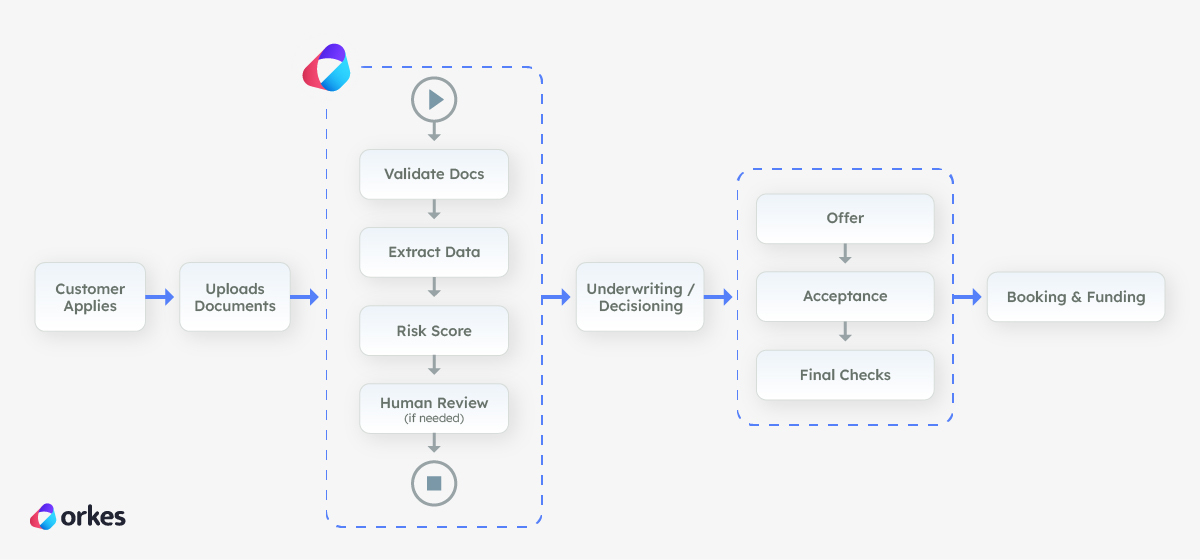
In a loan origination system, this agentic workflow sits right after the customer applies and uploads their documents, and before the application reaches final underwriting.
The workflow checks that the files are usable, pulls out the key details (like identity and income signals), and runs an initial risk check to see how safe it is to keep processing automatically.
If everything looks clean and consistent, it helps the application move forward faster. If anything looks unclear or higher risk, it automatically routes the case to a human using Conductor's built-in Human task so the bank doesn’t rely on automation when it shouldn’t.
First, here is what the Risk Assessment agentic workflow looks like in Orkes Conductor. Seeing it will help you visualize the entire thing.
The workflow starts with an agentic sub-workflow task as its first step.
The sub-workflow task is a built-in Orkes Conductor task, which in this example uses OCR (Optical Character Recognition) to read the user’s document and extract key fields from it, along with the document type. So it could be a W2, a passport, a driver's license, or another identification they provide.
The screenshot below shows you the full workflow, and you can see that the first step is the sub-workflow, which I will go into next.
The main benefit of using a sub-workflow is that you can have a separate process (workflow) run in its entirety in the main workflow. All without making the main workflow look messy. Think of it like function in programming.
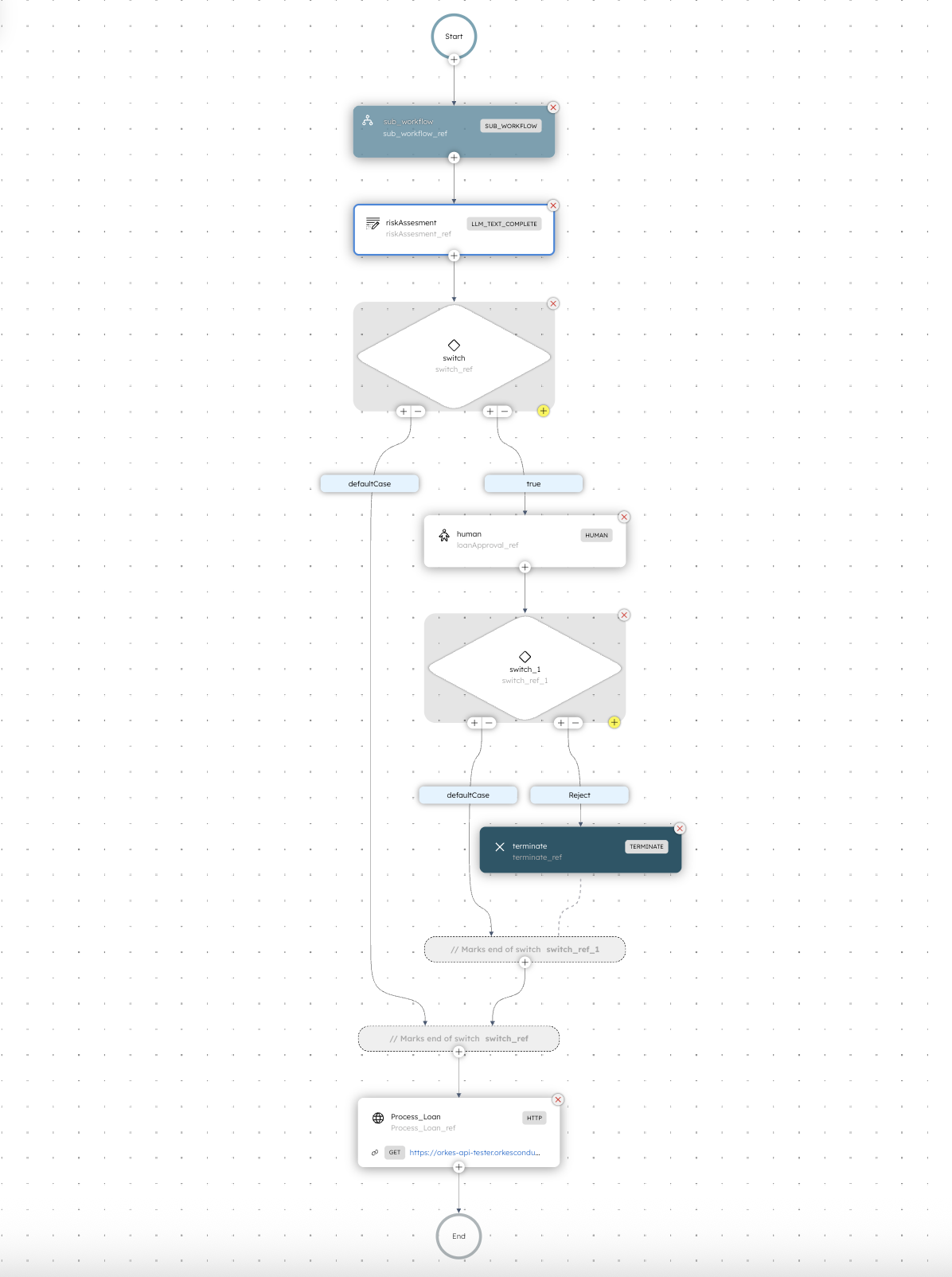
The data is then passed to a second task in the main workflow: a Conductor built-in LLM task, which is what makes this workflow an agentic workflow.
It takes the extracted document details (plus the applicant info), reasons over them together, and produces a loan risk score (how risky this application is to approve).
The workflow then outputs a routing flag to decide whether the case can safely continue through the rest of the automation or whether it should be sent to a person for review. A person can then reject the loan if it ends up on their desk so to speak, or approve it.
Here’s a more detailed look at the sub-workflow (called document_classifier in our case), which runs as the first step of the main workflow.
The sub-workflow is also an agentic workflow itself, because it contains an LLM step as part of the flow. If you're curious about what an agentic workflow is, a good way to remember is to see if in any part of the flow it uses an LLM for it's decision-making. It's honestly as simple as that.
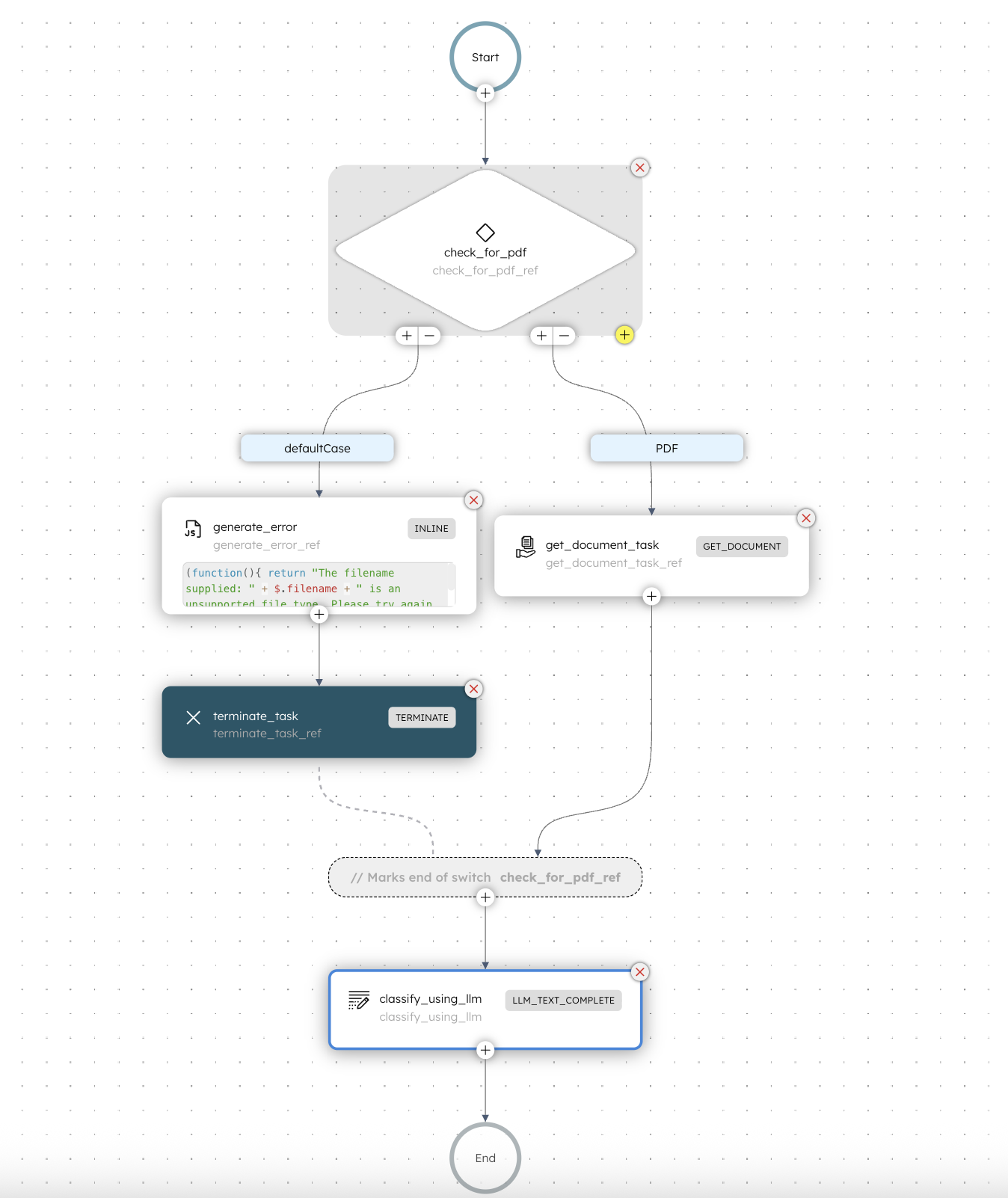
Think of this step as a preprocessing stage.
This smaller agentic workflow takes in the uploaded document, validates it using an LLM, and extracts the key details. Once it’s done, the main workflow continues to the next step using that output.
The document_classifier sub-workflow checks the uploaded document and makes sure it's a pdf, which for this workflow is what is expected. But when you are creating your own, you can write your own rules and you can check for any type of file you want.
In this case, if the file is NOT a PDF, then it generates an error for the user. So it could be something like "Hey pls upload a PDF, thank you" and it terminates the workflow.
Once the user uploads a new document (hopefully the correct one) then the entire workflow starts again.
If all looks good, and the file is a PDF, it goes into the get_document_task step, which is another Conductor built-in task called Get Document.
It extracts important information from the PDF file, and then passes it to the next task in this workflow, which in our case is another LLM task which classifies what the document type is.
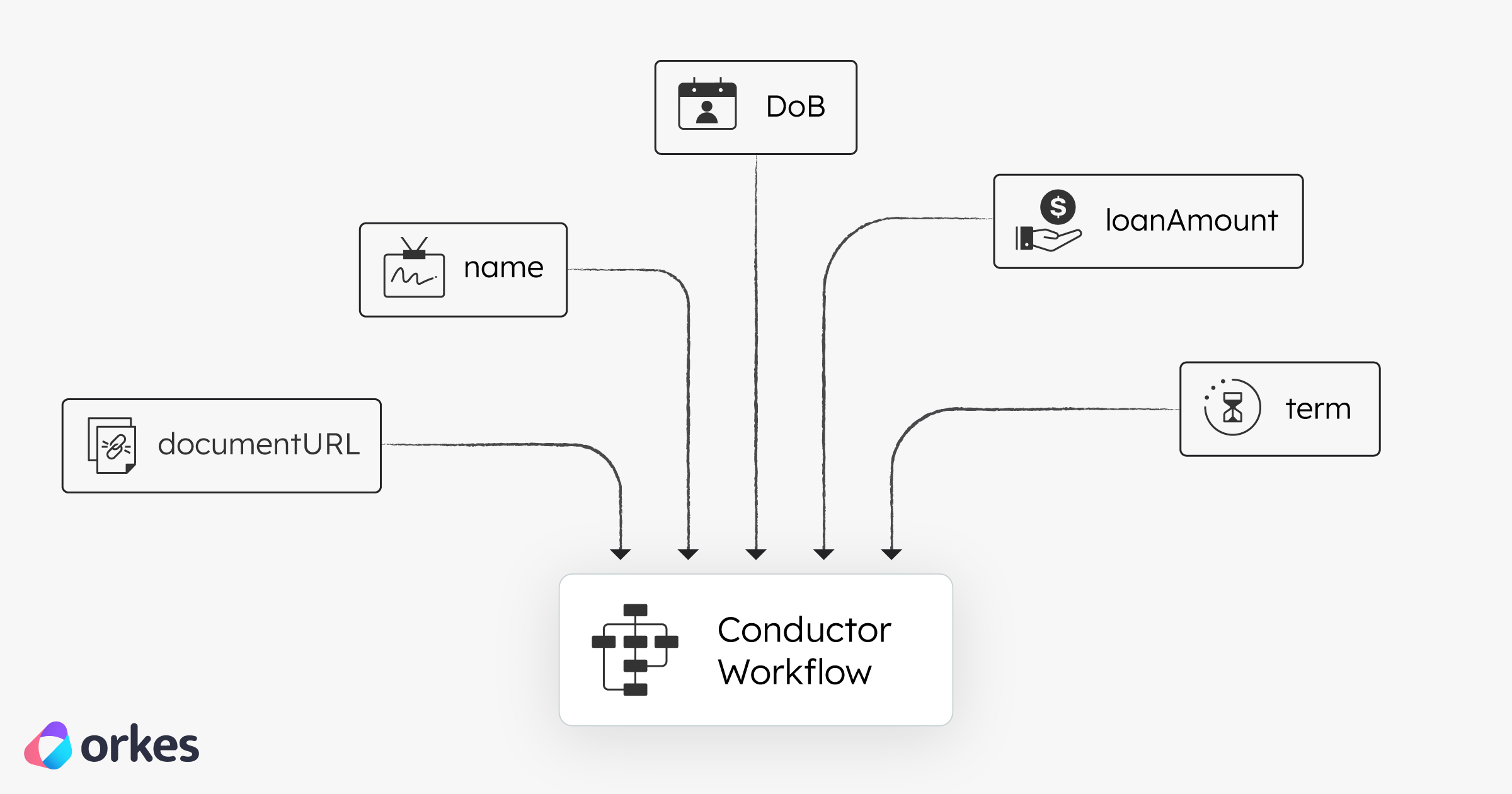
As you can see from the illustration above, the following inputs go into the main workflow:
documentUrl — link to the applicant’s uploaded PDF in this casename — applicant namedoB — applicant's date of birthloanAmount — applicant's requested amountterm — loan duration the application requestsA quick summary of what's happening across both the sub-workflow and the main one.
| Step | Stage | What happens | Output / Decision |
|---|---|---|---|
| 1 | Check File Type | Inspect the URL and continue only if it’s a PDF | If not PDF: friendly error + terminate cleanly |
| 2 | Fetch the Document | Use GET_DOCUMENT to download the PDF and extract text | Extracted PDF text |
| 3 | Classify Using LLM | OpenAI model analyzes extracted text | Document type + relevant metadata |
| Step | Stage | What happens | Output / Decision |
|---|---|---|---|
| 4 | Run LLM Risk Scoring | Combine applicant fields + the classified document; LLM generates decisioning | Risk score, interest rate suggestion, explanation, humanApproval: true/false |
| 5 | Conditional Routing | If humanApproval = true, open a HUMAN task; otherwise continue | Human task opened or proceed to automation |
| 6 | Process Loan Automatically | Trigger an HTTP call to finalize the loan | Loan finalized (automated) |
Conductor helps you turn a complicated AI process into clear and reliable steps (like checking documents, using an LLM to score risk, sending edge cases to a human for approval, and calling APIs to finish the job.)
Instead of relying on one big script or a single LLM prompt, you get more control, better tracking of what happened, and safer error handling.
The result is a smoother system where AI does the fast work and humans handle the tricky calls, making important decisions (like loan approvals) safer and more dependable.