AGENTIC ENGINEERING
Enterprise Uptime Guardrails: Build a Website Health Checker Workflow (HTTP Checks + Inline Logic + SMS Alerts)

Maria Shimkovska
Content Engineer
Last updated: December 2, 2025
December 2, 2025
5 min read


Join thousands of developers building the future with Orkes.
In banking, website health checks are crucial for ensuring customers can access services and complete transactions. If the login page, or customer portal, or a payment initiation endpoint goes down, customers can't access account and transfers may fail. This can lead to contact centers getting overwhelmed fast and customers potentially losing trust in the bank. And even short outages can trigger reputational damage and mistrust.
So this workflow acts like a lightweight guardrail for critical endpoints like:
It answers the question:
"Can our customers authenticate and reach our banking services right now. And if not, can we page the on-call team immediately so we can fix it?"
In e-commerce, a health check like this protects revenue on the checkout path. Yes, it does also prevent users from getting annoyed when the website is down, but from a business perspective you do want to make sure that nothing interrupts the checkout flow and it's smooth and pleasant for users.
If a checkout page or payments endpoint or a cart API become unhealthy, sales can drop immediately. Having an automated workflow to detect failures early and paging the right team before customers complain is critical for any successful ecommerce business.
Here are example endpoints this workflow can monitor and be a guardrail for:
Like in the previous example, it answers a similar question: "Can our customers complete their purchase right now? If not, we need to alert the on-call team immediately with enough context to act quickly."
To keep things simple and predictable, “healthy” here is based on HTTP status codes only.
If the website returns any status code in the 200–299 range, we treat that as healthy. Anything else (including errors and timeouts) is treated as unhealthy and will trigger an on-call page (SMS via Twilio in this example).
Later, if you want, you can expand this in a bunch of directions too. For example, you can add response-time thresholds (“it’s technically up but it’s very slow”), content checks (“it’s up but the page is serving the wrong thing”), SSL/redirect checks (“the endpoint is up but it’s redirecting somewhere sketchy or the cert is expired”), and preventing duplicate alerts (“don’t text me every minute while it’s still down”).
But for a starter workflow, status codes are a really solid baseline for this example.
This section walks through the workflow tasks and how the data flows between them. Like in my other examples, the goal isn’t just to show you what tasks are used, but why they’re wired this way.
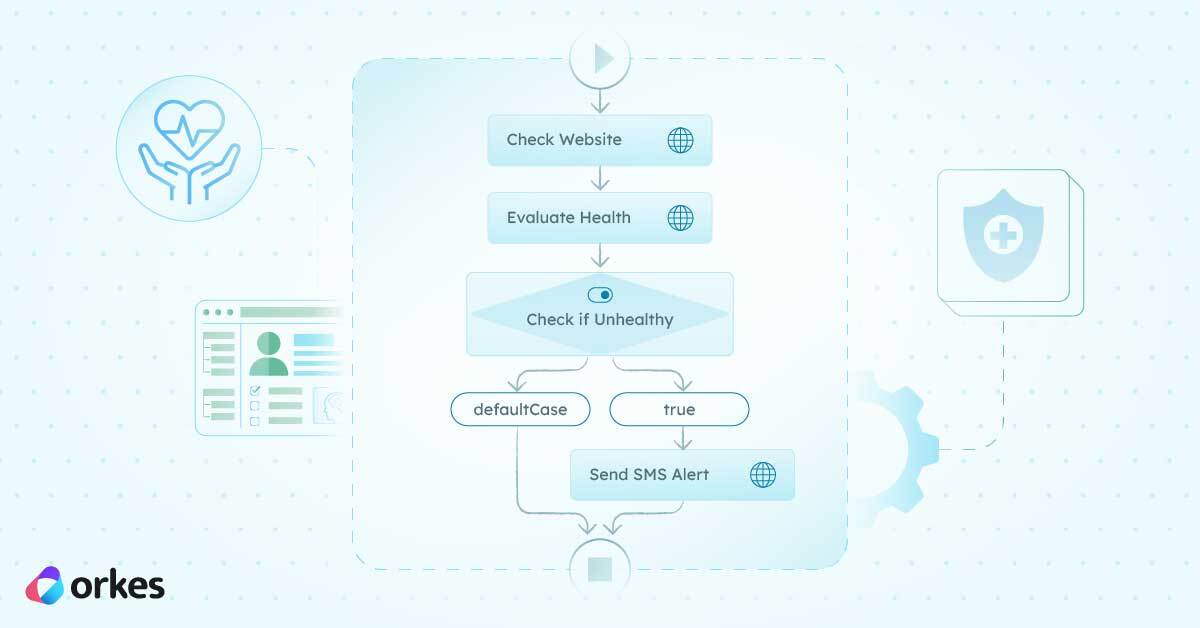
At a high level, this workflow has three phases:
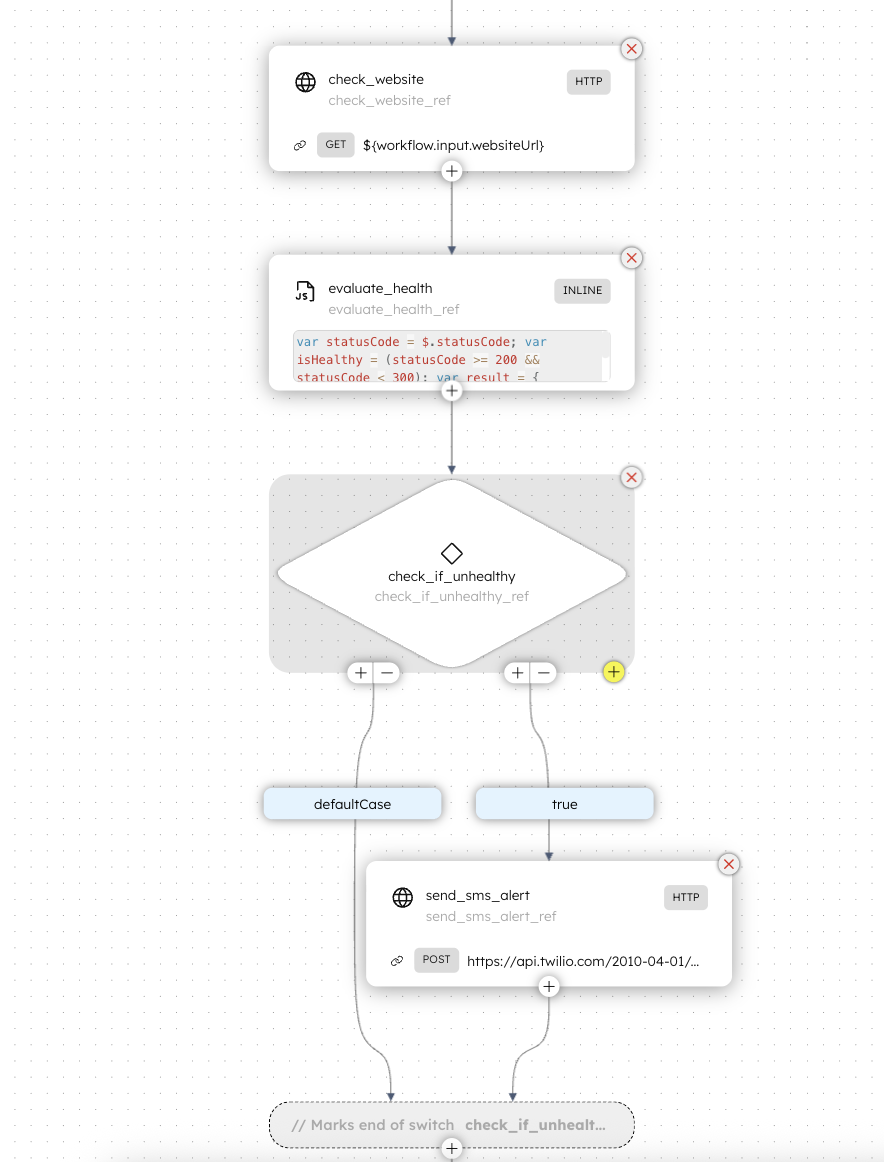
The workflow starts by calling your website URL. Then it evaluates what came back. And if the outcome is “this looks bad,” it branches into the SMS alert path.
A nice thing about doing it this way (instead of doing everything inside one big script) is that each step is easy to inspect. If you’re debugging later, you can open the workflow execution and immediately see where it failed and what the inputs/outputs were for that task.
Here’s what you pass into the workflow execution:
The first task is check_website, and it’s a built-in Conductor HTTP task. It sends a GET request to whatever URL is passed into websiteUrl.
It’s configured with short timeouts (3 seconds for connection and 3 seconds for reading), which is usually what you want for a health check. If a site can’t respond quickly, you’d rather treat that as suspicious and alert sooner rather than later.
It also retries a couple times (retryCount: 2). That helps avoid false alarms from one-off network hiccups.
Key output used later:
check_website_ref.output.response.statusCode
Next comes evaluate_health, which is an INLINE task running a small JavaScript snippet (GraalJS). This is the “translator” step. It takes a raw status code and turns it into something more human friendly.
Instead of passing around “statusCode = 503” and forcing every downstream step to interpret that, this task produces a nice little result object that looks like:
{
  "healthy": true,
  "statusCode": 200,
  "message": "Website is healthy",
  "checkedAt": "2025-12-03T12:34:56.789Z"
}
Note: This step might feel “extra” at first, but it’s actually what makes the workflow easy to extend. Once you have a clean result object, you can add new alert paths later (Slack, email, PagerDuty, etc.) without rewriting how health is calculated.
After we’ve got a clean healthy: true/false, the workflow runs a SWITCH task called check_if_unhealthy.
The SWITCH checks this expression:
$.healthy === false
If that evaluates to true (meaning: it’s unhealthy), the workflow takes the alert branch and sends an SMS. If it evaluates to false (meaning: it’s healthy), it just finishes without doing anything dramatic.
If we hit the unhealthy branch, the workflow runs send_sms_alert, which is another HTTP task. It calls Twilio’s Messages API endpoint and sends a text message to your phone.
The alert includes the status code, so at a glance you can tell whether it was a server error, a client error, etc.
You could do this as a tiny script, but scripts tend to turn into little snowballs that keep growing. Once you want retries, timeouts, branching, clean outputs, auditing, and easy extensions, Conductor gives you that structure without you needing to reinvent it each time.
Also: when something goes wrong, you can open the workflow execution and see exactly what happened. That’s the kind of boring reliability you actually want in anything ops-related.
With Conductor's UI you cam easily copy and paste a workflow definition and have it be built right in front of your eyes. It's super cool. Check it out. You can make a free account in our Developer Edition and copy/paste the following code in the code tab when you create a new workflow definition:
{
  "name": "website_health_checker",
  "description": "Monitors website health by checking HTTP response status and response time",
  "version": 1,
  "tasks": [
    {
      "name": "check_website",
      "taskReferenceName": "check_website_ref",
      "inputParameters": {
        "http_request": {
          "uri": "${workflow.input.websiteUrl}",
          "method": "GET",
          "connectionTimeOut": 3000,
          "readTimeOut": 3000
        }
      },
      "type": "HTTP",
      "decisionCases": {},
      "defaultCase": [],
      "forkTasks": [],
      "startDelay": 0,
      "joinOn": [],
      "optional": false,
      "defaultExclusiveJoinTask": [],
      "asyncComplete": false,
      "loopOver": [],
      "retryCount": 2,
      "onStateChange": {},
      "permissive": false
    },
    {
      "name": "evaluate_health",
      "taskReferenceName": "evaluate_health_ref",
      "inputParameters": {
        "evaluatorType": "graaljs",
        "expression": "var statusCode = $.statusCode; var isHealthy = (statusCode >= 200 && statusCode < 300); var result = { 'healthy': isHealthy, 'statusCode': statusCode, 'message': isHealthy ? 'Website is healthy' : 'Website is down or unhealthy', 'checkedAt': new Date().toISOString() }; result;",
        "statusCode": "${check_website_ref.output.response.statusCode}"
      },
      "type": "INLINE",
      "decisionCases": {},
      "defaultCase": [],
      "forkTasks": [],
      "startDelay": 0,
      "joinOn": [],
      "optional": false,
      "defaultExclusiveJoinTask": [],
      "asyncComplete": false,
      "loopOver": [],
      "onStateChange": {},
      "permissive": false
    },
    {
      "name": "check_if_unhealthy",
      "taskReferenceName": "check_if_unhealthy_ref",
      "inputParameters": {
        "healthy": "${evaluate_health_ref.output.result.healthy}"
      },
      "type": "SWITCH",
      "decisionCases": {
        "true": [
          {
            "name": "send_sms_alert",
            "taskReferenceName": "send_sms_alert_ref",
            "inputParameters": {
              "http_request": {
                "uri": "https://api.twilio.com/2010-04-01/Accounts/${workflow.input.twilioAccountSid}/Messages.json",
                "method": "POST",
                "headers": {
                  "Authorization": "Basic ${workflow.input.twilioAuthToken}",
                  "Content-Type": "application/x-www-form-urlencoded"
                },
                "body": {
                  "To": "${workflow.input.phoneNumber}",
                  "From": "${workflow.input.twilioPhoneNumber}",
                  "Body": "ALERT: Website ${workflow.input.url} is down! Status code: ${evaluate_health_ref.output.result.statusCode}"
                },
                "encode": "FORM_URL_ENCODED"
              }
            },
            "type": "HTTP",
            "decisionCases": {},
            "defaultCase": [],
            "forkTasks": [],
            "startDelay": 0,
            "joinOn": [],
            "optional": false,
            "defaultExclusiveJoinTask": [],
            "asyncComplete": false,
            "loopOver": [],
            "onStateChange": {},
            "permissive": false
          }
        ]
      },
      "defaultCase": [],
      "forkTasks": [],
      "startDelay": 0,
      "joinOn": [],
      "optional": false,
      "defaultExclusiveJoinTask": [],
      "asyncComplete": false,
      "loopOver": [],
      "evaluatorType": "javascript",
      "expression": "$.healthy === false",
      "onStateChange": {},
      "permissive": false
    }
  ],
  "inputParameters": [],
  "outputParameters": {},
  "schemaVersion": 2,
  "restartable": true,
  "workflowStatusListenerEnabled": false,
  "ownerEmail": "my@email.com",
  "timeoutPolicy": "TIME_OUT_WF",
  "timeoutSeconds": 3600,
  "variables": {},
  "inputTemplate": {},
  "enforceSchema": true,
  "metadata": {},
  "maskedFields": []
}
This workflow is a simple, practical starter for monitoring a website. It checks a URL, interprets the result with small inline logic, and alerts you only when things look unhealthy. It’s small enough to feel approachable, but it’s also built in a way that makes it easy to grow into something more production ready later.
.png)