ENGINEERING SOLUTIONS
Workflow Versioning and Backward Compatibility: Stop Breaking Long-Running Executions

Nick Lotz
Content Engineer
Last updated: March 17, 2026
March 17, 2026
18 min read


Join thousands of developers building the future with Orkes.
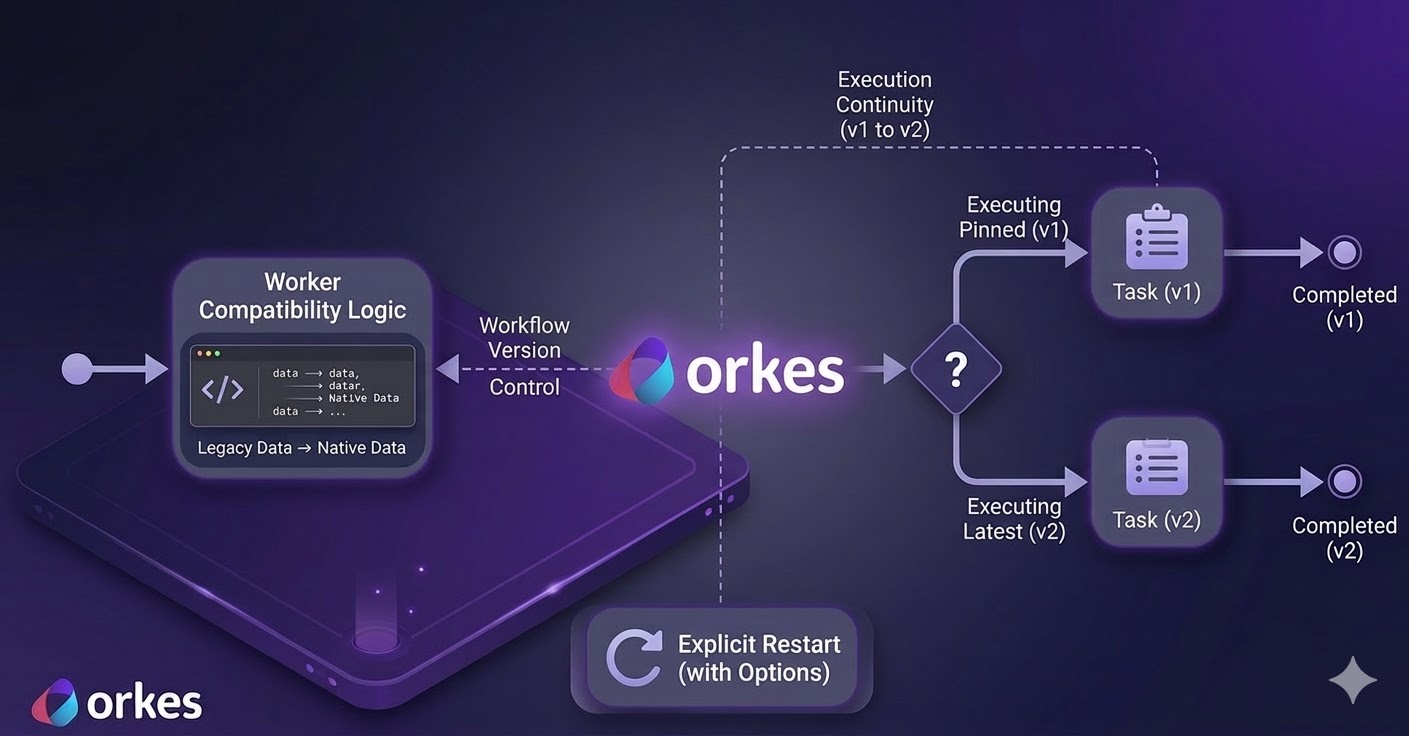
In production systems, workflow versioning is often treated as a metadata concern when it should really be a correctness concern. The distinction matters because long-running orchestration has a time dimension. In other words, workflow definitions can change while executions are still in flight.
Consider a loan origination workflow. Your team releases a new workflow version with updated risk logic and data expectations. New applications succeed, but without proper version mapping older applications might retry with an old data schema and fail when hitting updated steps.
The problem illustrated here is contract evolution under asynchronous execution. Or, put simply, timing! Teams update a workflow while older executions are still in progress and for a while, both versions run side by side. This means the system has to behave correctly when those older runs retry, pause, or restart.
For a versioning model to be operationally safe, three properties are required.
First, workflow starts must be deterministic: callers can pin a version, and unpinned starts resolve predictably to the latest version.
Second, execution continuity must be explicit. A running or completed execution should not silently switch to a different workflow definition unless an operator or system action requests that transition.
Third, worker compatibility windows must exist. During migrations, workers must accept legacy and current payload schemas without introducing nondeterministic side effects (such as duplicate writes across retries).
Without these controls in place, changing workflow definitions and schemas becomes a real production gamble.
Orkes Conductor is an open source workflow orchestration engine for distributed systems. Teams use it to define multi-step business processes, run them reliably, and track execution state, often across long-running operations.
For versioning, Conductor makes behavior explicit. A start request without a version uses the latest registered definition. A start request with a version runs that exact definition. Also, running executions do not switch definitions automatically. They continue under their current execution context unless you explicitly restart them. At restart time, you can preserve current semantics or opt into the latest definition.
Let's walk through an example. Consider a customer onboarding workflow with two versions. Version 1 normalizes customer identity fields and terminates. While Version 2 keeps normalization and adds a risk-tier assignment task. The worker is written to understand both old and new input formats. It converts either format into one standard internal format before processing.
The walkthrough validates four hypotheses. First, pinned starts execute against version 1 semantics. Second, unpinned starts should resolve version 2 semantics. Third, legacy-shaped payloads still execute under the latest version (version 2) when worker compatibility is implemented. Finally, restart behavior changes based on explicit restart mode rather than some hidden state mutation.
This walkthrough assumes a Linux host (Ubuntu/Debian). If your environment is different, adapt package names accordingly.
sudo apt-get update
sudo apt-get install -y \
  curl jq git \
  python3 python3-venv python3-pip \
  openjdk-21-jdk
Why these dependencies are required: Java 21+ is required by conductor server start, Python is required for the demo worker and verifier, and jq is used for inspection.
Sanity checks:
java -version
python3 --version
jq --version
Expected result: java -version reports Java 21 or newer.
Install the official OSS CLI.
curl -fsSL https://raw.githubusercontent.com/conductor-oss/conductor-cli/main/install.sh | sh
conductor --version
Expected result: conductor --version prints a CLI version string.
Boot a local OSS server directly from CLI.
conductor server start --oss --port 8080
conductor server status
On first run, conductor server start downloads the server jar (large download). Final readiness output should include the API endpoint http://localhost:8080/api and a healthy server status.
If needed:
conductor server logs -n 100
This step creates an isolated sandbox for the demo so you do not mix artifacts with other local projects. The directory layout is intentional: fixtures/ holds test payloads, task_defs/ and workflow_defs/ hold Conductor metadata, worker/ contains the polling worker, and scripts/ contains validation utilities.
mkdir -p ~/conductor-workflow-versioning-demo/{task_defs,workflow_defs,fixtures,worker,scripts}
cd ~/conductor-workflow-versioning-demo
cat > requirements.txt <<'REQ'
requests
REQ

python3 -m venv .venv
source .venv/bin/activate
pip install -r requirements.txt

export CONDUCTOR_SERVER_URL="http://localhost:8080/api"
CONDUCTOR="conductor --server ${CONDUCTOR_SERVER_URL}"
Expected result: pip install -r requirements.txt completes without errors, and $CONDUCTOR resolves to a working CLI command prefix.
Write the three workflow input fixtures:
These three inputs model the migration window explicitly. input_v1.json is legacy-only. input_v1_to_latest.json is legacy-shaped traffic intentionally sent to latest. input_v2.json is native v2 traffic.
cat > fixtures/input_v1.json <<'JSON'
{
  "legacyCustomerId": "cust-legacy-1001",
  "email": "legacy.customer@example.com",
  "country": "US",
  "orderValue": 650,
  "riskSignals": []
}
JSON

cat > fixtures/input_v1_to_latest.json <<'JSON'
{
  "legacyCustomerId": "cust-legacy-2001",
  "email": "legacy.to.latest@example.com",
  "country": "CA",
  "orderValue": 1800,
  "riskSignals": ["address_mismatch"]
}
JSON

cat > fixtures/input_v2.json <<'JSON'
{
  "customerId": "cust-v2-3001",
  "contact": {
    "email": "v2.customer@example.com",
    "phone": "+1-555-0100"
  },
  "region": "US",
  "orderValue": 7200,
  "loyaltyTier": "GOLD",
  "riskSignals": ["address_mismatch", "device_new"]
}
JSON
Expected result: all three files are written under fixtures/ and will be reused as deterministic test vectors during execution.
Write task definitions:
These task definitions register the two worker-polled task types. If names here do not match what the worker polls, workflows will remain in RUNNING waiting for tasks to complete.
cat > task_defs/normalize_customer_profile_task.json <<'JSON'
{
  "name": "normalize_customer_profile",
  "description": "Normalize customer payload from legacy and v2 formats",
  "retryCount": 3,
  "timeoutSeconds": 120,
  "responseTimeoutSeconds": 60
}
JSON

cat > task_defs/assign_risk_tier_task.json <<'JSON'
{
  "name": "assign_risk_tier",
  "description": "Compute risk tier from normalized customer and order context",
  "retryCount": 3,
  "timeoutSeconds": 120,
  "responseTimeoutSeconds": 60
}
JSON
Expected result: two JSON files under task_defs/ with names normalize_customer_profile and assign_risk_tier.
Write workflow definitions:
customer_onboarding version 1 contains only normalization. Version 2 adds an explicit risk step. This controlled difference is what lets us prove pinned start behavior versus latest-resolution behavior.
cat > workflow_defs/customer_onboarding_v1.json <<'JSON'
{
  "name": "customer_onboarding",
  "description": "v1 onboarding flow for legacy payloads",
  "version": 1,
  "schemaVersion": 2,
  "tasks": [
    {
      "name": "normalize_customer_profile",
      "taskReferenceName": "normalize_customer",
      "type": "SIMPLE",
      "inputParameters": {
        "customerId": "${workflow.input.customerId}",
        "legacyCustomerId": "${workflow.input.legacyCustomerId}",
        "email": "${workflow.input.email}",
        "contact": "${workflow.input.contact}",
        "region": "${workflow.input.region}",
        "country": "${workflow.input.country}"
      }
    }
  ],
  "outputParameters": {
    "customerId": "${normalize_customer.output.customerId}",
    "schemaUsed": "${normalize_customer.output.schemaUsed}"
  }
}
JSON

cat > workflow_defs/customer_onboarding_v2.json <<'JSON'
{
  "name": "customer_onboarding",
  "description": "v2 adds risk assignment while preserving backward compatibility",
  "version": 2,
  "schemaVersion": 2,
  "tasks": [
    {
      "name": "normalize_customer_profile",
      "taskReferenceName": "normalize_customer",
      "type": "SIMPLE",
      "inputParameters": {
        "customerId": "${workflow.input.customerId}",
        "legacyCustomerId": "${workflow.input.legacyCustomerId}",
        "email": "${workflow.input.email}",
        "contact": "${workflow.input.contact}",
        "region": "${workflow.input.region}",
        "country": "${workflow.input.country}"
      }
    },
    {
      "name": "assign_risk_tier",
      "taskReferenceName": "assign_risk",
      "type": "SIMPLE",
      "inputParameters": {
        "customerId": "${normalize_customer.output.customerId}",
        "region": "${normalize_customer.output.region}",
        "orderValue": "${workflow.input.orderValue}",
        "loyaltyTier": "${workflow.input.loyaltyTier}",
        "riskSignals": "${workflow.input.riskSignals}"
      }
    }
  ],
  "outputParameters": {
    "customerId": "${normalize_customer.output.customerId}",
    "schemaUsed": "${normalize_customer.output.schemaUsed}",
    "riskTier": "${assign_risk.output.riskTier}"
  }
}
JSON
Expected result: two workflow definition files under workflow_defs/, both named customer_onboarding but with versions 1 and 2.
Create the worker:
This worker intentionally dual-reads legacy and v2 input shapes, then writes normalized output. It is the compatibility layer for mixed-version traffic.
cat > worker/run_worker.py <<'PY'
#!/usr/bin/env python3
from __future__ import annotations
import argparse, datetime as dt, os, time
import requests

def pick(*values):
    for v in values:
        if v is None:
            continue
        if isinstance(v, str) and not v.strip():
            continue
        return v
    return None

def normalize(inp):
    contact = inp.get("contact") if isinstance(inp.get("contact"), dict) else {}
    cid = pick(inp.get("customerId"), inp.get("legacyCustomerId"), contact.get("customerId"))
    email = pick(inp.get("email"), contact.get("email"), "unknown@example.invalid")
    region = pick(inp.get("region"), inp.get("country"), contact.get("country"), "US")
    if cid is None:
        raise ValueError("customerId or legacyCustomerId is required")
    use_v2 = bool(inp.get("customerId") or contact)
    return {
        "customerId": str(cid),
        "email": str(email),
        "region": str(region),
        "schemaUsed": "v2" if use_v2 else "v1_legacy",
        "compatibilityMode": "native_v2" if use_v2 else "mapped_from_legacy",
        "normalizedAt": dt.datetime.now(dt.timezone.utc).isoformat(),
    }

def risk(inp):
    value = float(inp.get("orderValue") or 0)
    score = 2 if value >= 5000 else 1 if value >= 1000 else 0
    tier = "HIGH" if score >= 2 else "MEDIUM" if score >= 1 else "LOW"
    return {"riskTier": tier, "riskScore": score, "computedAt": dt.datetime.now(dt.timezone.utc).isoformat()}

def main():
    p = argparse.ArgumentParser()
    p.add_argument("--base-url", default=os.getenv("CONDUCTOR_SERVER_URL", "http://localhost:8080/api"))
    p.add_argument("--max-empty-polls", type=int, default=0)
    args = p.parse_args()
    session = requests.Session()
    worker = os.getenv("WORKER_INSTANCE_ID", "worker-versioning-demo-1")
    empty = 0
    while True:
        handled = False
        for task_type in ["normalize_customer_profile", "assign_risk_tier"]:
            r = session.get(f"{args.base_url}/tasks/poll/{task_type}", params={"workerid": worker}, timeout=30)
            if r.status_code == 204:
                continue
            r.raise_for_status()
            task = r.json()
            if not task or not task.get("taskId"):
                continue
            inp = dict(task.get("inputData", {}))
            out = normalize(inp) if task_type == "normalize_customer_profile" else risk(inp)
            payload = {
                "taskId": task["taskId"],
                "workflowInstanceId": task.get("workflowInstanceId"),
                "workerId": worker,
                "status": "COMPLETED",
                "outputData": out,
            }
            session.post(f"{args.base_url}/tasks", json=payload, timeout=30).raise_for_status()
            handled = True
            break
        if handled:
            empty = 0
            continue
        empty += 1
        if args.max_empty_polls and empty >= args.max_empty_polls:
            break
        time.sleep(1)

if __name__ == "__main__":
    main()
PY
chmod +x worker/run_worker.py
Create the execution verifier:
The verifier is a deterministic assertion tool. It fetches execution details and exits non-zero if version/schema/task expectations are not met.
cat > scripts/verify_execution.py <<'PY'
#!/usr/bin/env python3
from __future__ import annotations
import argparse, json, os, requests

def latest(tasks, ref):
    m = [t for t in tasks if t.get("taskReferenceName") == ref or t.get("referenceTaskName") == ref]
    return (m[-1].get("outputData") if m else None) or {}

def main():
    p = argparse.ArgumentParser()
    p.add_argument("--workflow-id", required=True)
    p.add_argument("--base-url", default=os.getenv("CONDUCTOR_SERVER_URL", "http://localhost:8080/api"))
    p.add_argument("--expect-version", type=int)
    p.add_argument("--expect-schema")
    p.add_argument("--expect-risk-task", choices=["any", "present", "absent"], default="any")
    a = p.parse_args()
    w = requests.get(f"{a.base_url}/workflow/{a.workflow_id}", params={"includeTasks": "true"}, timeout=30).json()
    status = w.get("status")
    version = w.get("version", w.get("workflowVersion"))
    tasks = w.get("tasks", [])
    norm = latest(tasks, "normalize_customer")
    risk = latest(tasks, "assign_risk")
    errors = []
    if status != "COMPLETED":
        errors.append(f"status={status}")
    if a.expect_version is not None and version != a.expect_version:
        errors.append(f"version={version}")
    if a.expect_schema and norm.get("schemaUsed") != a.expect_schema:
        errors.append(f"schema={norm.get('schemaUsed')}")
    if a.expect_risk_task == "present" and not risk:
        errors.append("risk missing")
    if a.expect_risk_task == "absent" and risk:
        errors.append("risk present")
    print(json.dumps({"errors": errors, "status": status, "version": version, "normalize": norm, "risk": risk}, indent=2))
    raise SystemExit(1 if errors else 0)

if __name__ == "__main__":
    main()
PY
chmod +x scripts/verify_execution.py
Expected result: both scripts are executable and available at worker/run_worker.py and scripts/verify_execution.py.
This registration sequence is idempotent. create handles first run. If a definition already exists, the command falls through to update. This keeps reruns safe.
$CONDUCTOR task create task_defs/normalize_customer_profile_task.json \
  || $CONDUCTOR task update task_defs/normalize_customer_profile_task.json

$CONDUCTOR task create task_defs/assign_risk_tier_task.json \
  || $CONDUCTOR task update task_defs/assign_risk_tier_task.json

$CONDUCTOR workflow create workflow_defs/customer_onboarding_v1.json \
  || $CONDUCTOR workflow update workflow_defs/customer_onboarding_v1.json

$CONDUCTOR workflow create workflow_defs/customer_onboarding_v2.json \
  || $CONDUCTOR workflow update workflow_defs/customer_onboarding_v2.json
Verify both versions:
$CONDUCTOR workflow get customer_onboarding 1 | jq -r '.name, .version'
$CONDUCTOR workflow get customer_onboarding 2 | jq -r '.name, .version'
Expected result: verification prints customer_onboarding followed by 1 and 2 from the two commands.
Keep this terminal running. It is the execution engine for polled tasks. If you stop it, workflow starts will queue tasks but not complete.
cd ~/conductor-workflow-versioning-demo
source .venv/bin/activate
python worker/run_worker.py --max-empty-polls 200
Expected result: process remains active and continuously polls for tasks.
Use a second terminal to drive execution commands and assertions while the worker keeps polling.
cd ~/conductor-workflow-versioning-demo
source .venv/bin/activate
export CONDUCTOR_SERVER_URL="http://localhost:8080/api"
CONDUCTOR="conductor --server ${CONDUCTOR_SERVER_URL}"
Start explicit v1:
WF_V1=$($CONDUCTOR workflow start \
  -w customer_onboarding \
  -f fixtures/input_v1.json \
  --version 1)

echo "$WF_V1"
python scripts/verify_execution.py \
  --workflow-id "$WF_V1" \
  --expect-version 1 \
  --expect-schema v1_legacy \
  --expect-risk-task absent
Expected result: echo "$WF_V1" prints a workflow UUID, and verifier output includes "errors": [].
Start latest with legacy-shaped input:
WF_LATEST_LEGACY=$($CONDUCTOR workflow start \
  -w customer_onboarding \
  -f fixtures/input_v1_to_latest.json)

echo "$WF_LATEST_LEGACY"
python scripts/verify_execution.py \
  --workflow-id "$WF_LATEST_LEGACY" \
  --expect-version 2 \
  --expect-schema v1_legacy \
  --expect-risk-task present
Expected result: UUID is returned, verifier reports version 2, schema v1_legacy, risk task present, and "errors": [].
Start latest with native v2 input:
WF_LATEST_V2=$($CONDUCTOR workflow start \
  -w customer_onboarding \
  -f fixtures/input_v2.json)

echo "$WF_LATEST_V2"
python scripts/verify_execution.py \
  --workflow-id "$WF_LATEST_V2" \
  --expect-version 2 \
  --expect-schema v2 \
  --expect-risk-task present
Expected result: verifier reports version 2, schema v2, risk task present, and "errors": []. If any check sees status=RUNNING, wait a few seconds and rerun that verifier command.
This first restart preserves current definition semantics, so the workflow should still behave like v1.
$CONDUCTOR workflow restart "$WF_V1"
python worker/run_worker.py --max-empty-polls 50
python scripts/verify_execution.py \
  --workflow-id "$WF_V1" \
  --expect-version 1 \
  --expect-risk-task absent
Then restart with latest definitions:
This second restart opts into latest-definition semantics, so the same workflow instance should now include the v2 risk step.
$CONDUCTOR workflow restart --use-latest "$WF_V1"
python worker/run_worker.py --max-empty-polls 50
python scripts/verify_execution.py \
  --workflow-id "$WF_V1" \
  --expect-risk-task present
If restart returns 409 (workflow ... RUNNING is not in terminal state), run the worker again, wait for terminal completion, then retry restart.
You should finish with three started workflow IDs plus one restarted ID. All verifier runs should show empty error arrays. That is your concrete proof that version pinning, latest resolution, backward compatibility, and restart semantics are all behaving as designed.
The key finding from this experiment is that workflow definition evolution is only safe when runtime semantics and compatibility logic are designed together. Conductor's explicit start and restart semantics provide control-plane determinism, but correctness still depends on worker-level compatibility during migration windows.
In practice, this supports a conservative migration policy: introduce compatibility first, shift new traffic second, apply restart/upgrade decisions intentionally, then retire legacy parsing only after observed convergence.
Orkes Cloud extends the operational surface modeled above, including direct upgrade operations for running workflows.
For example, the following API call upgrades an existing running workflow instance to a newer workflow definition.
curl -X POST \
  "https://developer.orkescloud.com/api/workflow/${WORKFLOW_ID}/upgrade" \
  -H "X-Authorization: ${CONDUCTOR_AUTH_TOKEN}" \
  -H "Content-Type: application/json" \
  -d '{
    "name": "customer_onboarding",
    "version": 2,
    "workflowInput": {
      "migrationTag": "wave-2"
    }
  }'
The engineering principle remains unchanged: backward compatibility and explicit migration policy are still required. Cloud capabilities primarily reduce operational toil and improve control ergonomics at scale.
Workflow versioning should be treated as a runtime systems problem, not a documentation problem. Teams that model it this way can reason about failures before they appear in incident channels, and can prove migration safety with executable checks rather than assumptions.
If you want to apply the same methodology on a managed control plane, you can evaluate it on Orkes Developer Edition today.