AGENTIC ENGINEERING
Technical Guide: Orchestrating Your LangChain Agents for Production with Orkes Conductor

Maria Shimkovska
Content Engineer
Last updated: January 19, 2026
January 19, 2026
20 min read


Mar 24, 2026
Mar 17, 2026
Mar 17, 2026
Join thousands of developers building the future with Orkes.
Learn how to orchestrate LangChain agents for production using Orkes Conductor with retries, human approval, and full observability.
Your LangChain agent worked perfectly in testing or even in production by itself. But then you need to add more agents to interact with it. You deploy those to production too. Agent A finished, Agent B is waiting, Agent C failed halfway through, and you have no idea what state your system is in. Your carefully crafted agents have become a distributed debugging nightmare.
Building the agent itself is the easier part right now. As it should be. Especially with all the dev tools that we have at our disposal to make that happen. The hard part is making it work with everything else.
In enterprise environments, your LangChain agent is almost never the whole story. It's one piece of a much larger system.
You've got multiple agents that need to coordinate. You've got external services and APIs to integrate. You need human approval at certain checkpoints. You need conditional workflows based on business logic. You need to handle failures gracefully when something goes wrong (because it will).
Without proper orchestration, you end up with brittle integrations, code that resembles a bunch of jumbled up cords, and no easy way to see what's actually happening when issues arise.
The gap between "I built an agent" and "I run a production agentic system" is orchestration.
That's the gap this guide addresses. And that's where Orkes Conductor fits in too.
I'm going to show you how to take your working LangChain agents and plug them into robust, scalable workflows using Conductor.
Who should read this guide:
This is a longer piece because there is genuinely a lot to cover, and I won't do you justice if I just skim over things. I didn't want to just give you bullet points and send you on your way.
This guide will also grow so you can always have a reference for when you want to go from LangChain agents to complex multi-agentic real world systems.
If you're already comfortable with LangChain agents, skip to the next section. Otherwise, this foundation is essential for understanding what we're orchestrating with Conductor.
In LangChain, an agent is an LLM wrapped in a reasoning loop that can call tools and decide when it's finished. That's the industry-standard definition.
The key thing LangChain does: you don't write that loop yourself. LangChain handles it.
And here's what matters for orchestration: each agent manages its own internal loop, but knows nothing about the larger system. Your agent is brilliant in isolation and blind to everything else. That's by design and exactly where Conductor comes in.
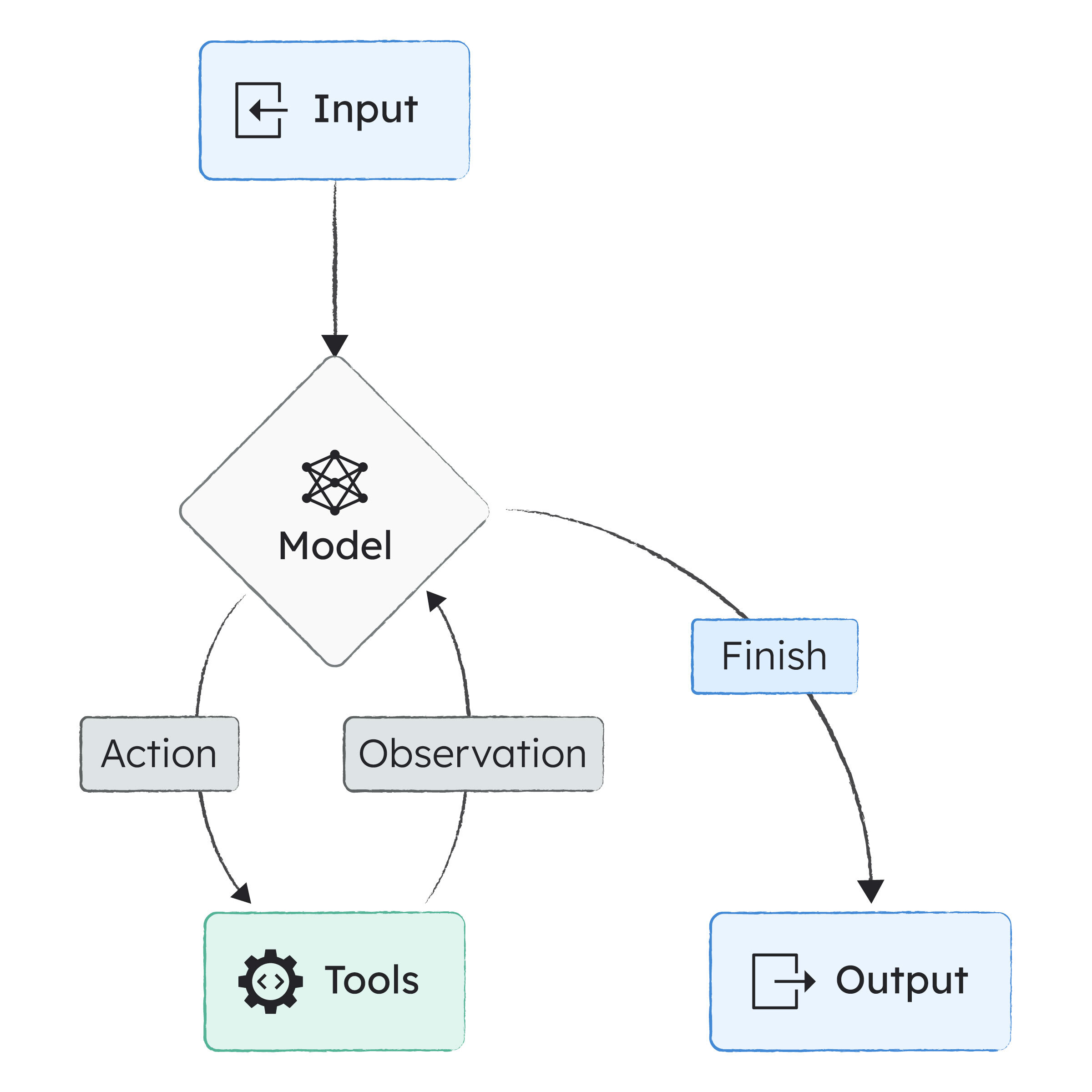
I'm going to show you how to build a meeting preparation agent that can search for company information, the smallest useful example that demonstrates how agents actually work.
Here's why this matters:
Here's the minimal agent in LangChain (using the JavaScript SDK):
const agent = createAgent({
  model: "gpt-4",
  tools: []
});
This gives you a language model, message history, a reasoning loop, and automatic stopping conditions. Without any tools, it just behaves like a normal LLM call. But add tools, and it becomes something a bit more capable.
Tools are how an agent does anything beyond generating text and only having access to their own knowledge base. In LangChain, a tool is just a function with a name, a typed input schema, and a description:
const companySearch = tool(
  async (name) => `Info about ${name}`,
  {
    name: "company_search",
    schema: z.object({ name: z.string() }),
    description: "Search for information about a company"
  }
);
LangChain uses the schema and description to tell the model when the tool is relevant and how to call it properly.
Once you've defined your tools, you add them to the agent:
const agent = createAgent({
  model: "gpt-4",
  tools: [companySearch]
});
The model can now decide when to use these tools during its reasoning loop. Need more tools? Just add them to the array.
The system prompt tells your agent how to approach tasks:
systemPrompt: `You are a meeting preparation assistant. Summarize key information concisely.`
How you write this prompt directly impacts whether the agent uses tools effectively and when it decides it's accomplished its goal.
Invoking your agent looks like this:
await agent.invoke({
  messages: [
    { role: "user", content: "Prepare me for a meeting with Orkes" }
  ]
});
From here, LangChain handles everything: the reasoning steps, tool calls, message accumulation, and stopping conditions. You get back a complete answer.
You don't need special infrastructure to run a LangChain agent locally. It's just JavaScript (or Python) calling an LLM.
Install the packages:
npm install langchain @langchain/openai zod
export OPENAI_API_KEY=your_key_here
node agent.js
LangChain handles the agent loop entirely in-process. There's no background service, no separate "agent server" unless you build one.
See a complete example in this Github gist.
Once you run it locally you should see something like this:
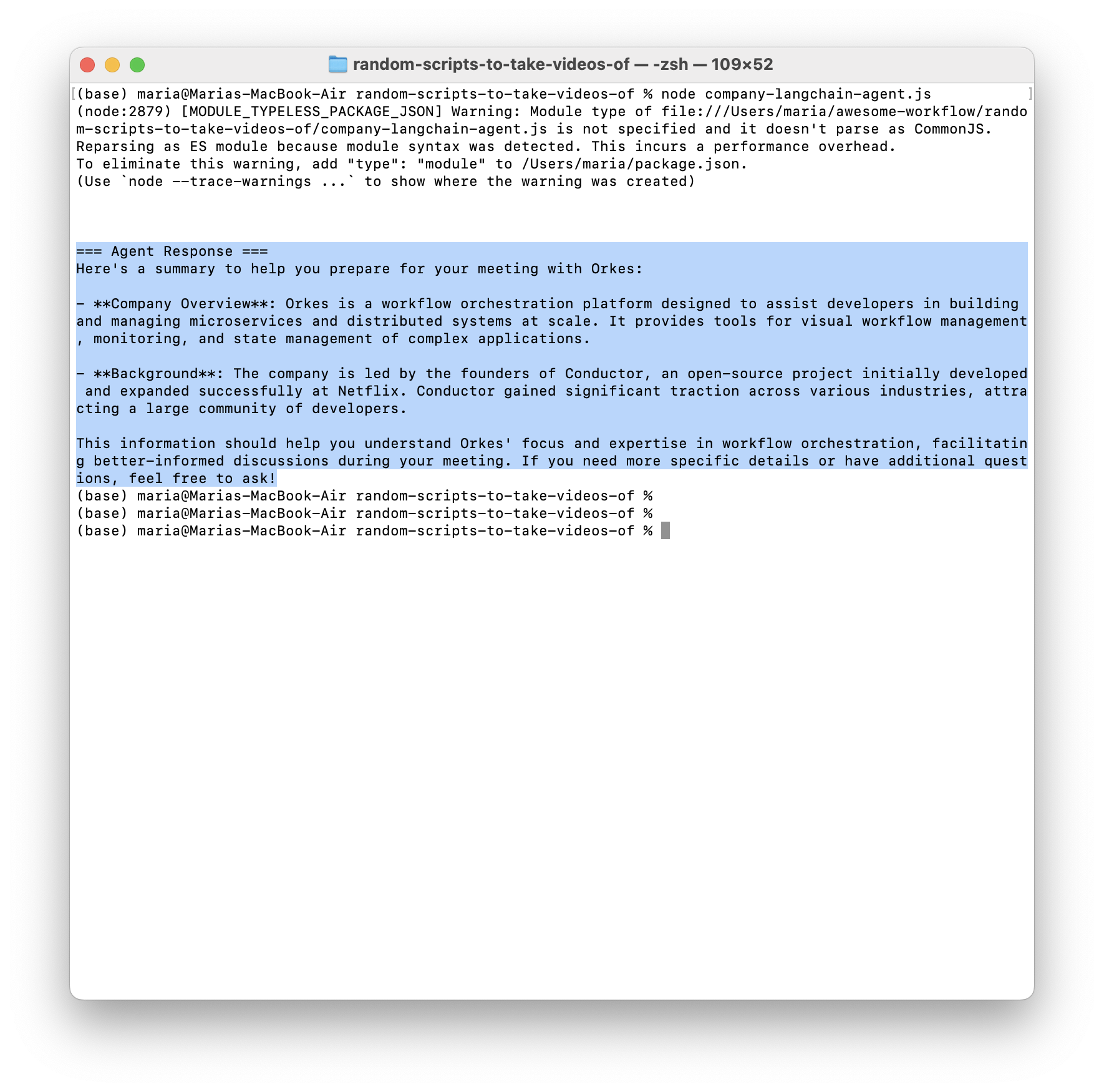
The agent is hardcoded to ask for information on Orkes as a company (the prompt is hardcoded), but you can also change it to ask for any other company. The agent knows about three companies we gave it external information about, that it can reference if the LLM is unsure.
// Mock database of company information
const companyDatabase = {
    "orkes": "Orkes is a workflow orchestration platform that helps developers build and manage microservices and distributed systems at scale. It provides visual workflow management, monitoring, and state management for complex applications. Orkes is spearheaded by the founding members of Conductor, who successfully developed and expanded the open-source project during their tenure at Netflix. This effort led to widespread adoption across industries and companies of all sizes fueled by an enthusiastic community of developers.",
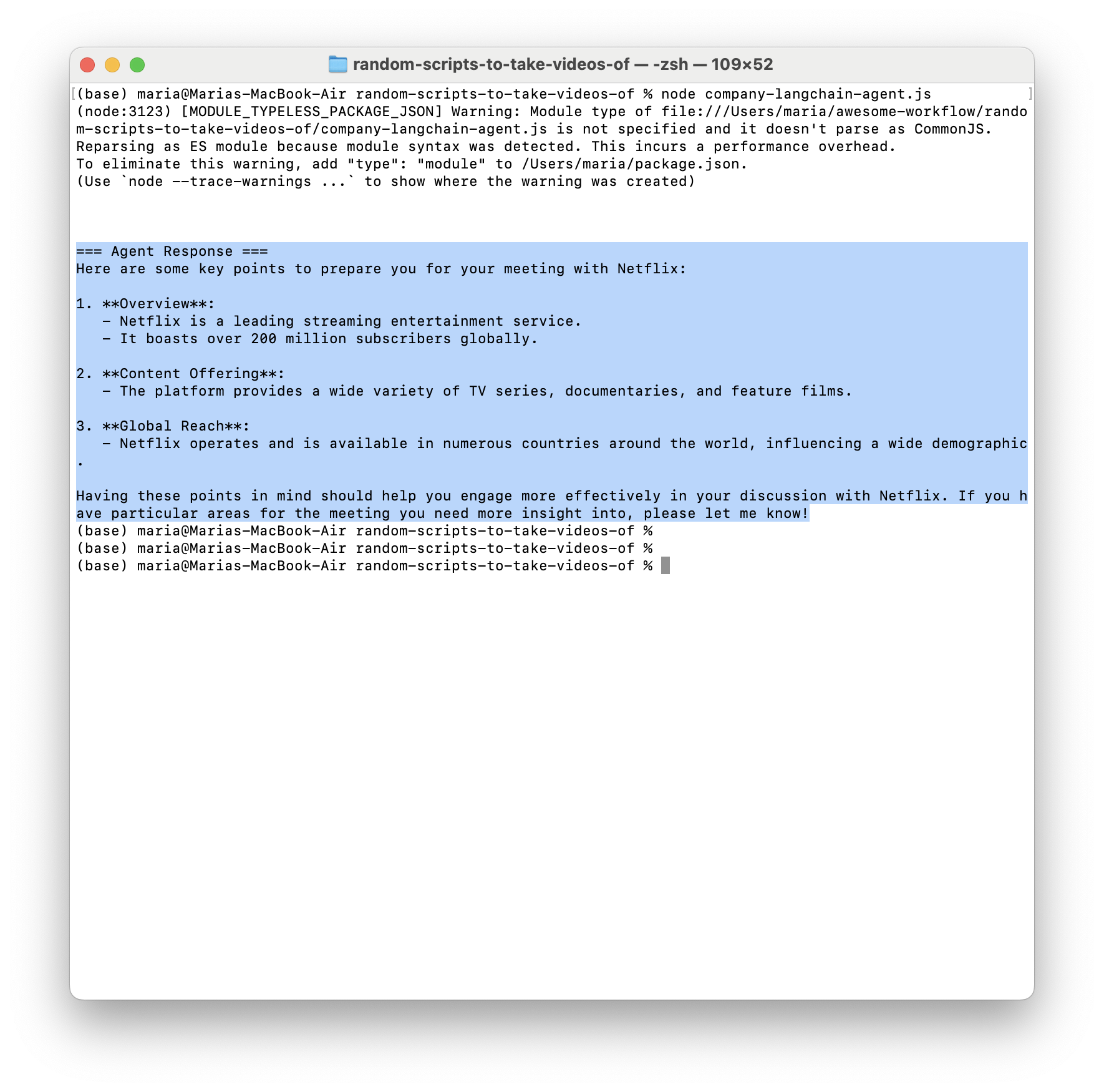
    "netflix": "Netflix is a streaming entertainment service with over 200 million subscribers worldwide, offering TV series, documentaries, and feature films.",
    "stripe": "Stripe is a technology company that provides payment processing services. Founded in 2010, they serve millions of businesses worldwide."
};
If I ask it about Netflix, it returns:
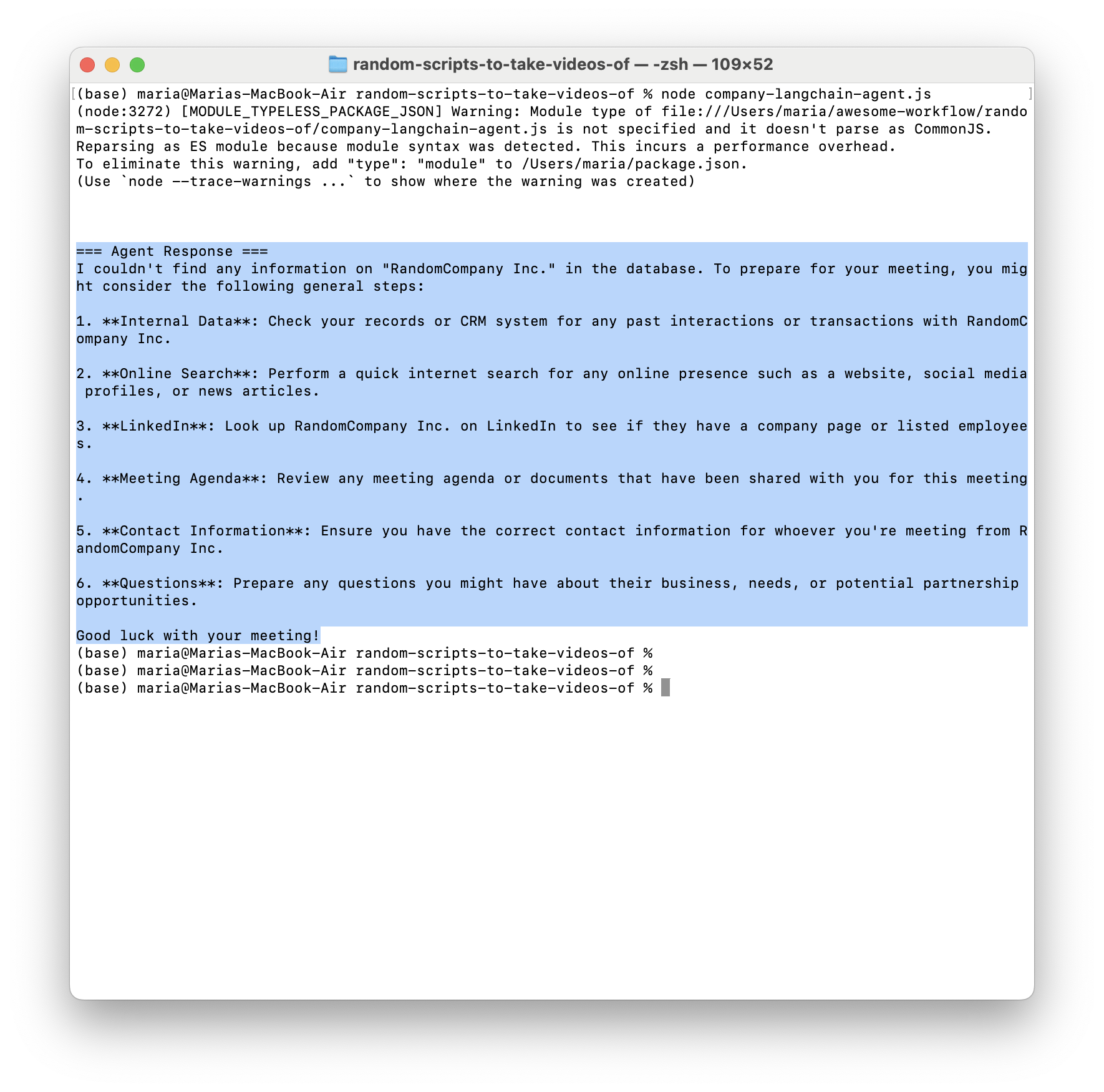
If I ask it about company RandomCompany Inc:
LangChain agents are: LLM + tools + a loop you don't have to write.
Now here's what makes this interesting for orchestration: that clean agent you just built? It has no idea about the world outside its own loop. It doesn't know about the three other agents that need its output. It doesn't know that a human needs to approve before it proceeds. It doesn't know that Agent B failed and the whole workflow needs to roll back.
That’s the gap we’re filling.
Before we go further, let's be crystal clear about what orchestration actually means. Orchestration is coordinating different systems so they work together as one seamless process.
People mostly describe it like conducting an orchestra because of the name. Each musician (your agent, API, database, or service) plays their own instrument brilliantly. But without a conductor, they don't know when to play, who goes first, or how to respond when someone makes a mistake.
The orchestrator is the conductor. It:
Without orchestration, your components need to know about each other. Agent A needs to know how to call Agent B. Agent B needs to know where Agent C lives. Everyone needs custom integration code.
With orchestration, components don't talk to each other directly. They talk to the orchestrator. The orchestrator coordinates everything.
Your LangChain agent doesn't need to know about the payment API, the approval system, or the three other agents in the workflow. It just does its job and returns a result. The orchestrator handles the rest. That's what we're building toward.
You need multiple agents working together. Agent A needs to finish before Agent B can start. Agent C needs the output from both A and B. You start writing custom coordination code. Maybe you use message queues. Maybe you use webhooks. Maybe you just run them sequentially in a script.
It works until it doesn't. Agent A fails halfway through. Now what? You've got partial state scattered across multiple systems.
Your agent makes a decision, but you need human approval before proceeding. Where does the workflow pause? How do you resume it? How do you handle the case where the human says "no"? How do you notify the human in the first place?
You end up building a custom approval system. Then another one for a different workflow. Then you're maintaining half a dozen different approval mechanisms, each with slightly different behavior.
Something went wrong. Was it Agent A? Was it Agent B? Was it the API call between them? What was the state when it failed? What were the inputs? What about the outputs?
You start adding logging. Then more logging. Then you're drowning in logs with no way to trace a single workflow execution from start to finish. You can't visualize the flow. You can't see where the bottleneck is.
Six months later, you need to add a new step to the workflow. Or change the order. Or add conditional logic based on the output.
But your workflow is scattered across multiple files, multiple services, maybe even multiple repositories. Making changes is terrifying because you can't see the whole picture. You're not sure what will break. So you may even delay important changes because it's just too hard to even get into it.
Your LangChain agent is 30 minutes into a complex research task, calling multiple APIs, processing data and building up context. Then your server restarts for a routine deployment and everything's gone. All that research, all those API calls you paid for, all that progress are wiped.
This is the hidden cost of running AI agents in production. LLM calls are expensive and slow. A single research task might cost $2 in API calls and take 15 minutes to complete. Lose that work because your infrastructure hiccuped and you're burning money and frustrating your users.
The problem gets worse with long-running workflows. Your agentic system might need to run for several hours while gathering comprehensive data, pause for days waiting for human approval, coordinate multiple agents that each take 20+ minutes to complete, or handle API rate limits by retrying over extended periods. Every infrastructure failure, deployment, or restart becomes a catastrophic loss of state. Restarting a 6-hour workflow from the beginning because one service went offline in hour 5 isn't an option.
Durable execution is a system's ability to preserve its state and continue running even when things go wrong.
With durable execution, your workflows inherit critical capabilities like:
This is one of the most important problems orchestrators actually solve, so I recommend diving deeper into it. We have two really good articles dedicated to this topic:
This is exactly why more teams are turning to orchestration platforms. They realize their agentic systems are like living organisms, constantly growing and evolving, and you need infrastructure to support that. Because beyond building something, you will spend a ton of time maintaining and changing it.
Orkes Conductor is an orchestrator that solves these problems by giving you a platform designed for exactly this kind of work:
Conductor doesn't replace your LangChain agents but gives you the infrastructure to coordinate how they work together with each other and with other parts of a system.
Your agents stay simple. They do one thing well. Conductor handles the coordination, the error handling, the human approvals, the conditional logic—all the messy stuff that turns a single agent into a production system.
And when you're ready, you can expose those workflows as MCP tools, making your orchestrated multi-agent systems available to even larger AI ecosystems.
In the next section I will dive into a concrete example of how you can coordinate multiple LangChain agents into a pretty simple Conductor workflow. For this guide we are using LangChain, but this patterns works with any agent you have.
Link to the whole Github repo for this project: Orkes Conductor Project with LangChain Agents
Let me introduce you to a problem that's perfect for demonstrating multi-agent orchestration: relocating your healthcare needs to a new country.
If you've ever moved internationally, you can relate to this nightmare: getting a new doctor, understanding a whole new healthcare system, checking if certain medications have different names or need prescriptions, gathering your medical records from your previous doctor to send to a new one, writing a bunch of emails to get all of this done—all while dealing with potential language barriers and all the other tasks you need to do when moving and settling in.
It's messy, it's important, and it has real consequences if you get it wrong.
This kind of problem can be built into a bigger agentic solution where you orchestrate specialized agents to handle a lot of this work for you. Just to make things much easier.
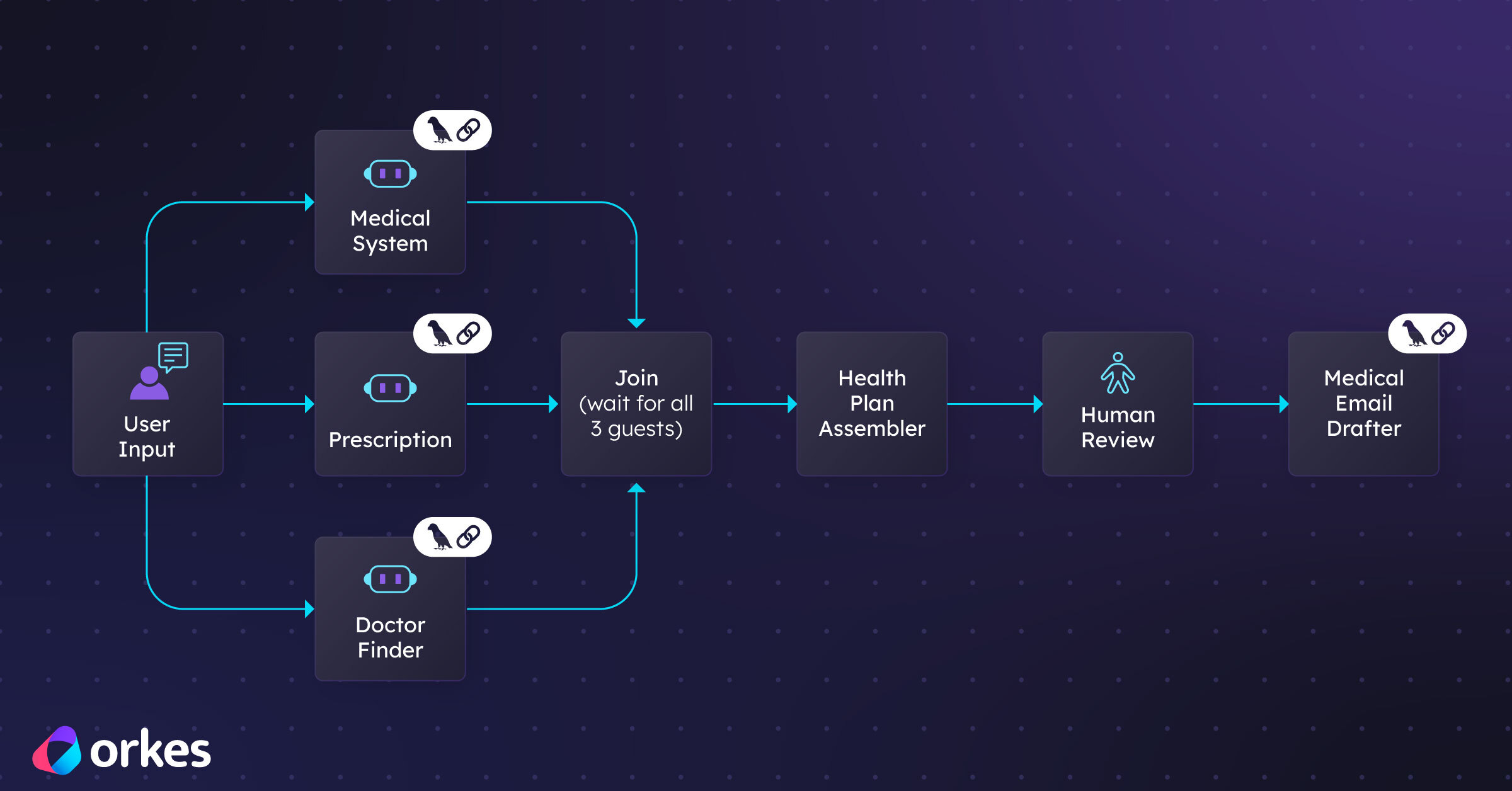
This project has four specialized LangChain agents.
This workflow has four specialized LangChain agents:
Searches for doctors based on specialty, location (like if they're in your zip code), language, and insurance. Also checks whether they even accept new patients and when. This is a lot of research to do on your own.
Explains how healthcare works in your destination country. Even if the answer isn't perfect right now because of complexities around whether LLMs even fully know all the intricacies, it still gives you a pretty big head start and saves you time.
This can be pretty serious, especially for people who take daily medications. The goal of this agent is to check medications and import requirements. Like do you need a special letter from your doctor for bringing medications while you figure out when you can get a new prescription? It also researches whether medications have different names in your new country.
This is another time saver. This agent writes all those emails you need to send to your current doctor and potential new doctors so you can get all your medical records and find a new doctor.
Each agent in this case is really good at its specific case. But the real power of making all of this work in a real world situation, and making sure it's not just cool but also useful, comes from orchestrating these agents into a cohesive workflow that solves the complete problem.
Here is how you can make this work technically: Each LangChain agent you build becomes a Worker task in Conductor.
In Conductor, a task is a unit of work that can be:
A Worker task is custom logic that runs in any language. Your LangChain agent becomes this custom logic. The worker sits outside Conductor, polls for work, executes tasks, and returns results.
Your LangChain agent code runs as a worker process that continuously polls Conductor asking "Do you have work for me?" When a workflow needs that agent to run, Conductor dispatches the request to an available worker. The worker executes your LangChain agent, returns the result to Conductor, and goes back to polling for more work.
This creates clean separation: your agent does its job, Conductor orchestrates when and how it runs. Your agent doesn't need to know about other agents, the workflow state, or retry logic. It just processes its input and returns output.
Conductor provides SDKs (JavaScript, Python, Go, Java, and others) that make it straightforward to wrap your LangChain agents as workers.
The pattern is consistent across all four agents. I'll show you how one agent is wrapped but this works for all. The code is available on GitHub if you want to clone and run it.
Let's walk through one example and see how this works in practice.
First, we build a focused LangChain agent that knows how to search for healthcare providers based on specific criteria.
import { createAgent, tool } from 'langchain';
import { z } from 'zod';

const MCP_URL =
  'https://api.orkes-demo.orkesconductor.io/dr-finder-service/mcp';

const callMcpTool = tool(
  async ({ toolName, args }) => {
    const res = await fetch(MCP_URL, {
      method: 'POST',
      headers: {
        'Content-Type': 'application/json',
        'ngrok-skip-browser-warning': 'true',
      },
      body: JSON.stringify({
        jsonrpc: '2.0',
        method: 'tools/call',
        params: {
          name: toolName,
          arguments: args ?? {},
        },
        id: Date.now(),
      }),
    });

    const payload = await res.json();

    if (!res.ok) {
      throw new Error(`MCP HTTP ${res.status}: ${JSON.stringify(payload)}`);
    }
    if (payload.error) {
      throw new Error(`MCP RPC error: ${JSON.stringify(payload.error)}`);
    }

    // Return STRING to avoid OpenAI/LangChain content-block issues
    return JSON.stringify(payload.result);
  },
  {
    name: 'call_mcp',
    description:
      'Call an MCP tool via JSON-RPC. Use toolName=GET_find_doctor to retrieve doctors.',
    schema: z.object({
      toolName: z.string().describe('MCP tool name (e.g. GET_find_doctor)'),

      // IMPORTANT: avoid z.record(z.any()) with zod v4
      // This accepts any JSON object as args.
      args: z.object({}).passthrough().optional(),
    }),
  }
);

function createHealthcareProviderFinderAgent() {
  return createAgent({
    model: 'openai:gpt-4o',
    tools: [callMcpTool],
    systemPrompt: `You are a Healthcare Provider Finder agent.

You have ONE tool: call_mcp.

Rules:
- Use call_mcp to retrieve doctor data.
- For doctor search, call toolName = "GET_find_doctor".
- Do not ask follow-up questions.
- Assume primary care + the city the user mentioned + English preference when relevant.

Workflow:
1) call_mcp (GET_find_doctor)
2) parse the returned JSON
3) rank and present up to 3 options + next steps

Safety: no medical advice or medication changes.`,
  });
}
A note on the
callMcpTool: In a real production system, this tool would connect to an actual healthcare provider database or API. For this demo, I'm using an MCP (Model Context Protocol) endpoint that simulates database queries and returns mock doctor data. The pattern is the same—your agent calls a tool, the tool fetches data, and the agent reasons about it. In your implementation, you'd swap this out for real database queries, API calls to healthcare directories, or whatever data source makes sense for your use case.
This agent is self-contained. It knows how to use its tools, it has clear instructions, and it can operate independently. But it's just one piece of the puzzle.
If you want to test it out quickly without much setup:
You can go to this Stackblitz link and run it yourself. Note: you will need to enter your own LLM provider API key. I am not giving you mine. 😄
If you want to run it locally:
You can copy the code from the file in the repository and run it locally. You'll need an OpenAI API key still set up.
You can change the user prompt to the agent through this line when you are invoking the agent:
  const result = await agent.invoke({
    messages: [
      {
        role: 'user',
        content:
          'I am moving to amsterdam and need an English-speaking primary care doctor soon.',
      },
    ],
  });
Now we wrap this agent as a Conductor Worker Task. This is the bridge moment where your standalone agent will be available to your Conductor workflows as just another task.
const healthcareProviderFinderWorker = {
  taskDefName: 'healthcare_provider_finder',
  execute: async (task) => {
    try {
      // 1. Input handling - Get query from Conductor
      const query = task.inputData?.query;

      if (!query) {
        return {
          outputData: { error: 'No query provided' },
          status: 'FAILED_WITH_TERMINAL_ERROR',
          reasonForIncompletion: 'Missing required input: query',
        };
      }

      // 2. Agent invocation - Run your LangChain agent
      const result = await agent.invoke({
        messages: [{ role: 'user', content: query }],
      });

      // 3. Output formatting - Extract and structure the response
      const response = result.messages[result.messages.length - 1].content;

      const toolsUsed = result.messages
        .filter((msg) => msg.tool_calls && msg.tool_calls.length > 0)
        .flatMap((msg) => msg.tool_calls.map((tc) => tc.name));

      return {
        outputData: {
          response: response,
          toolsUsed: toolsUsed,
          messageCount: result.messages.length,
        },
        status: 'COMPLETED',
      };
    } catch (error) {
      // 4. Error handling - Return structured error to Conductor
      return {
        outputData: { error: error.message },
        status: 'FAILED',
        reasonForIncompletion: `Agent execution failed: ${error.message}`,
      };
    }
  },
};
Notice what's happening here:
This wrapper is thin. The agent logic stays in the agent file. The wrapper file is just the bridge between Conductor and LangChain.
Notice what you didn't have to do: rewrite your agent. Your LangChain code stays clean. The orchestration logic lives in Conductor, where it belongs. 🙂
Now we register this task with Conductor and start a worker to handle executions:
import { orkesConductorClient, TaskManager } from '@io-orkes/conductor-javascript';
import { createHealthcareProviderFinderAgent } from '../LangChainAgents/DoctorFinder.js';

// Create the agent instance
const agent = createHealthcareProviderFinderAgent();

async function startWorker() {
  // Connect to Conductor
  const client = await orkesConductorClient({
    serverUrl: process.env.CONDUCTOR_SERVER_URL,
    keyId: process.env.CONDUCTOR_AUTH_KEY,
    keySecret: process.env.CONDUCTOR_AUTH_SECRET,
  });

  console.log('Connected to Conductor ✅');

  // Create TaskManager with your worker
  const taskManager = new TaskManager(
    client,
    [healthcareProviderFinderWorker],
    { options: { concurrency: 10, pollInterval: 300 } }
  );

  // Start polling for work
  taskManager.startPolling();

  // Graceful shutdown
  process.on('SIGINT', () => {
    taskManager.stopPolling();
    process.exit(0);
  });
}

startWorker();
What's happening here is elegant:
Your LangChain agent becomes a worker that sits idle, waiting for work Conductor dispatches tasks to it when needed The worker polls Conductor: "Do you have work for me?" When work arrives, it executes the LangChain agent and returns the result Conductor handles retries, timeouts, and workflow coordination
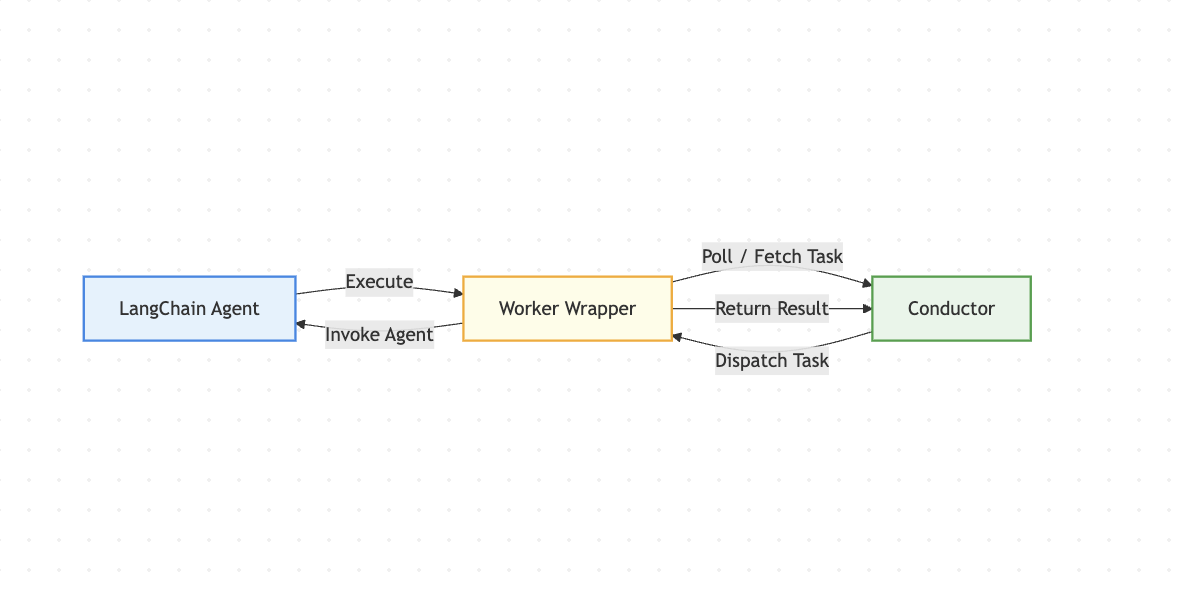
This creates a clean separation: your agent does its job, Conductor orchestrates when and how it runs.
The pattern we just walked through applies to all four agents. Let me show you the structure:
Each agent follows the same pattern: focused purpose, specific tools, clear instructions, wrapped as a Conductor task.
The really cool thing about this pattern is that you can build and test each agent independently. They don't know about each other and they don't need to.
Ok so now we have four independent agents, each wrapped as a Conductor task. How do we coordinate them into a cohesive workflow?
This is where 400 lines of JSON replaces what could've been 2,000 lines of coordination spaghetti.
We define the workflow as a JSON configuration.
Once it's set up, you can view or modify everything through the UI as well to see the order of execution.
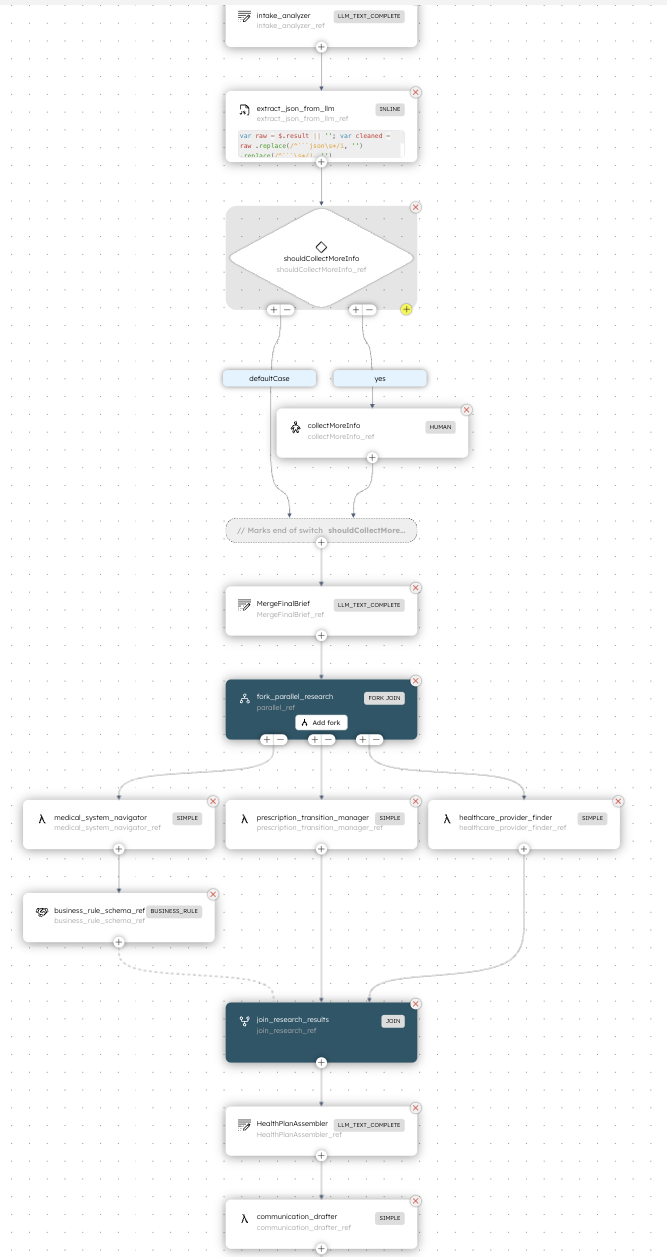
Look at what this workflow does:
The workflow is declarative. You describe what should happen, not how. Conductor handles:
Let's talk about what production actually looks like with this setup.
You run your worker processes:
# Start all workers
node ConductorWorkers/workers.js
These processes sit idle, polling Conductor for work. They're stateless—you can run multiple instances for high availability and load balancing. Conductor handles the distribution.
Starting a workflow is a simple API call (you can also start the workflow in the UI for testing):
import { orkesConductorClient } from '@io-orkes/conductor-javascript';

async function triggerHealthcareWorkflow() {
  const client = await orkesConductorClient({
    serverUrl: process.env.CONDUCTOR_SERVER_URL,
    keyId: process.env.CONDUCTOR_AUTH_KEY,
    keySecret: process.env.CONDUCTOR_AUTH_SECRET,
  });

  const workflowId = await client.workflowResource.startWorkflow({
    name: 'healthcare_relocation_workflow',
    version: 1,
    input: {
      query: "I am moving to the Netherlands in a couple of months. I don't know anything about the healthcare there and what I need to do. I am taking medication called medication123 for sleep that I need to take daily and I just need to figure it all out. I want to be set up with a complete healthcare plan and system so that I don't run out of meds before I get a chance to see a doctor."
    },
  });

  console.log(`Workflow started with ID: ${workflowId}`);
  return workflowId;
}

triggerHealthcareWorkflow();
Now the orchestration begins:
All of this is automated, coordinated, and observable.
The human review step deserves special attention. In production agentic systems, this is becoming pretty important. No one trusts AI (yet) but we still want to use it.
Why? Because while agents are good at research and draft generation, humans need to make the final decisions. Especially for something as important as healthcare.
In Conductor, implementing human-in-the-loop is straightforward:
{
  "name": "human_review",
  "taskReferenceName": "review_findings_ref",
  "type": "HUMAN",
  "inputParameters": {
    "systemInfo": "${system_info_ref.output.systemInfo}",
    "providers": "${provider_search_ref.output.providers}",
    "medicationInfo": "${medication_check_ref.output.medicationInfo}"
  }
}
When the workflow reaches this task:
This pattern is powerful because the LangChain agent does the research (saving you time) and you make the final decision. All while Conductor does the communication between all parties.
One of the biggest advantages of using Conductor is observability. Every workflow execution is tracked and visualizable.
In the Conductor UI, you can see:
This means when something goes wrong, you don't dig through logs. You open the Conductor UI, find the workflow execution, and see exactly what happened at each step.
Conductor handles failures gracefully. And this is pretty big. In production systems errors will happen and the processing latencies are high when dealing with LLMs down the stack. So one thing that makes a system truly great is how resilient it is. In your task definition:
{
  "name": "healthcare_provider_finder",
  "retryCount": 3,
  "retryLogic": "EXPONENTIAL_BACKOFF",
  "retryDelaySeconds": 60,
  "timeoutSeconds": 300,
  "responseTimeoutSeconds": 180
}
If the provider search fails (API timeout, rate limit, temporary error), Conductor automatically:
If the provider search fails (API timeout, rate limit, temporary error), Conductor automatically:
You don't write this retry logic. It's configured at the workflow level.
Production systems change constantly. Earlier I compared them to living organisms and I quite like this analogy. Three months from now you might need to add a new agent in your workflow for insurance verification, change the order of steps, add additional logic (like if the medication requires an import permit, then trigger an additional workflow), integrate with a new API, or add more human checkpoints.
With Conductor these changes are manageable because it's not super low level, so you don't have to write a lot of this logic yourself.
Create the LangChain agent, wrap it as a task, and register the worker. The agent is not available to any workflow.
Update the JSON definition or use Conductor's UI. No code changes needed. The workflow adapts immediately.
Want to add an insurance verification step? Insert it into the workflow array. Redeploy the workflow definition. That's it.
{
  "name": "healthcare_relocation_workflow",
  "tasks": [
    {
      "name": "medical_system_navigator",
      "taskReferenceName": "system_info_ref",
      "type": "SIMPLE"
    },
    {
      "name": "insurance_verifier",
      "taskReferenceName": "insurance_check_ref",
      "type": "SIMPLE",
      "inputParameters": {
        "query": "Verify insurance coverage for ${workflow.input.insurance_provider} in ${workflow.input.destination_country}"
      }
    },
    {
      "name": "healthcare_provider_finder",
      "taskReferenceName": "provider_search_ref",
      "type": "SIMPLE"
    }
  ]
}
Need to branch out based on medication requirement? Conductor handles the branching logic.
{
  "name": "check_medication_import",
  "taskReferenceName": "import_check_ref",
  "type": "SWITCH",
  "expression": "medication_check_ref.output.requiresImportPermit",
  "decisionCases": {
    "true": [
      {
        "name": "generate_import_permit_request",
        "taskReferenceName": "permit_request_ref",
        "type": "SIMPLE"
      }
    ]
  },
  "defaultCase": []
}
Every workflow has a version number. You can run v1 and v2 simultaneously. Migrate traffic gradually when/if needed. Roll back when/if needed.
This is the infrastructure that lets agentic systems evolve without breaking.
Before you start, make sure you have:
After creating your Orkes account, navigate to:
Access Control → Application
Create an application and note the Key ID and Key Secret — you’ll need them shortly.
git clone https://github.com/conductor-oss/awesome-conductor-apps
cd awesome-conductor-apps/javascript/healthcare-relocation-workflow-project-with-langchain

# Install Dependencies
npm install

# Set up environment variables
# Create a .env file in the project root
vim .env
# Add your API keys in the .env file

# Make an OpenAI API Key available to your app
export OPENAI_API_KEY=<your-openai-api-key>
This repository includes:
This project uses built-in LLM tasks in Orkes Conductor. To run the workflows successfully, you must configure an OpenAI integration in the Orkes Developer Edition.
openai (recommended)https://api.openai.comAdd the models your workflows will reference. The names must match exactly.
Example models:
gpt-4.1gpt-4.1-minigpt-4ogpt-4o-miniOnce this is done, Conductor can execute all LLM tasks used by the workflow.
This project includes a helper script that automates setup with Conductor.
From the project root, run:
node create-workflow.mjs
What this script does:
You can preview changes without applying them:
node create-workflow.mjs --plan
💡 Run this script whenever you modify workflow JSON files or set up a new environment.
The Conductor JavaScript SDK does not support registering LLM prompts programmatically.
You must create the following prompts manually in the Conductor UI, making sure the names match exactly:
workflows/prompts/medical-user-intake.jsonworkflows/prompts/combine-answers.jsonworkflows/prompts/assemble-health-plan.jsonYou can copy the full template text directly from each JSON file.
⚠️ Prompt names must match exactly or the workflow will fail at runtime.
Now start all LangChain agents as Conductor workers:
node ConductorWorkers/workers.js
If everything is working, you’ll see logs similar to:
Connected to Conductor ✅

INFO TaskWorker healthcare_provider_finder initialized
INFO TaskWorker communication_drafter initialized
INFO TaskWorker medical_system_navigator initialized
INFO TaskWorker prescription_transition_manager initialized
This means your workers are connected and polling for tasks.
Make sure the following task definitions exist in Conductor (they must match exactly):
If you used create-workflow.mjs, these are already registered.
Otherwise, you can create them manually in Task Definitions in the UI. Either way, a quick sanity check that they are actually there is always something I do just in case.
You can start the workflow either from the UI or via API.
Example using the SDK:
const workflowId = await client.workflowResource.startWorkflow({
  name: 'healthcare_relocation_workflow',
  version: 1,
  input: {
    query: "I am moving to the Netherlands and need help setting up my healthcare."
  }
});
Once started, you’ll be able to observe:
Try modifying the agents. Add new tools. Change the system prompts. See how it affects the workflow output.
Try modifying the workflow. Change the order of tasks. Add conditional logic. Run tasks in parallel.
This is the playground for understanding how LangChain agents and Conductor work together.
Ok. Let’s zoom out for a second.
You started this guide with a working LangChain agent. Maybe it searches for information. Maybe it drafts emails. Maybe it does something even cooler. And it works beautifully on its own.
But like we discussed, in production agents are built to be a part of a larger system. And agentic production can be very messy. It’s often multiple agents that need to coordinate. It’s human approvals that are needed at critical moments. It’s failures that need graceful handling. It’s systems that evolve every month as requirements change.
The gap between “I built a super cool agent” and “wow I have a bunch of agents that work together seamlessly in a production agentic system” is orchestration.
You can orchestrate on your own or you can use an orchestrator that is built to handle massive workflow scales.
And here is what you now have in your toolkit: 🧰
But here is the really cool part. You know how to build something that’s maintainable. Three months from now, when you need to add a new agent (or remove an old one), or change the workflow in any way, or integrate with a new API, you won’t be scared to actually do it. You’ll update a config file or go to the Orkes Conductor UI, add a new task and redeploy.
Because that's the reality of production agentic systems. They're not static projects you build and forget. They're living organisms that grow, change, and get more complex over time. And they need infrastructure that can keep up.
Your LangChain agents are still doing their jobs (finding providers, checking medications, drafting communications). They haven't changed. But now they're part of something bigger, something that solves the whole problem.
The code is waiting for you in the GitHub repo. Clone it. Run it. Break it. Modify it. Add your own agents. Build your own workflows. Make it yours.
So go build something amazing. And when it's 2 AM and something inevitably goes wrong, you'll open the Conductor UI, see exactly what happened at each step, fix the issue, and go back to bed.
Your future self will thank you. ☺️